My Channel What is Zopi? - All-in-one Dropshipping solution

How to Connect Your Store to Zopi

Update on: 21/01/2026

Table of contents

Why You Should Connect Your StoreSupported Store PlatformsStep-by-Step: Connect Your StoreStep 1: Open the Connect Store screenStep 2: Choose your store platformStep 3: Enter your store domainStep 4: Approve the connectionStep 5: Return to ZopiWhat to Do NextNeed Help?

Connecting your store helps you get the most out of Zopi. Once connected, Zopi becomes your central hub for managing products, orders, and fulfillment — so you can spend less time on manual work and more time growing your business.


Why You Should Connect Your Store

After connecting your store, you’ll be able to:

  • Import and push products faster without manual listing

  • Sync orders automatically into Zopi Order Center

  • Manage fulfillment in one place, from supplier mapping to tracking updates

  • Reduce errors and missed orders with clearer workflows

  • Save time every day by keeping everything in a single dashboard


Supported Store Platforms

Zopi currently supports:

  • ✅ Shopify

  • ✅ WooCommerce

  • ✅ BigCommerce

Other platforms are Coming soon.

  • ⏳ Amazon

  • ⏳ eBay

  • ⏳ Etsy

  • ⏳ Wix

  • ⏳ TikTok Shop

  • ⏳ Squarespace


Step-by-Step: Connect Your Store

Step 1: Open the Connect Store screen

  • In Zopi, click Connect now from the top banner

  • You’ll be redirected to the Connect store page.
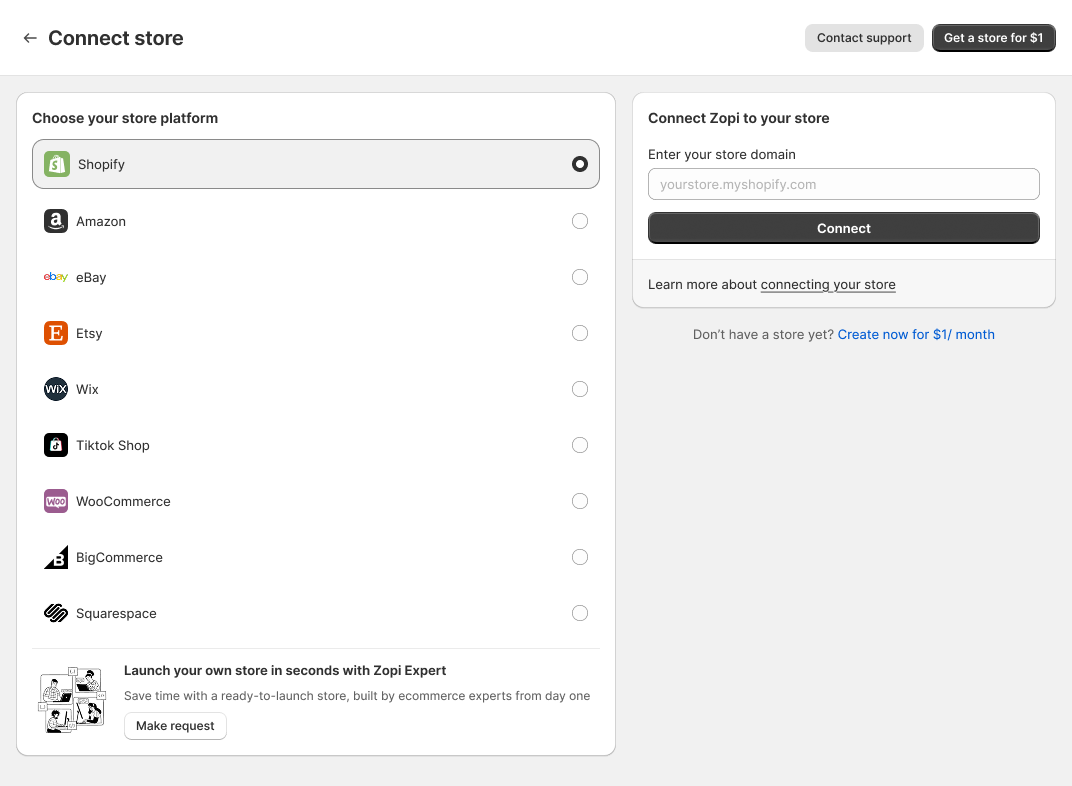
Step 2: Choose your store platform

Select your store platform (Shopify / WooCommerce / BigCommerce).

Step 3: Enter your store domain

In the Enter your store domain field, input your store domain, then click Connect.

Step 4: Approve the connection

You may be redirected to your platform to confirm installation/permissions.
Click Install / Approve to complete the connection.

Displaying detail.png

Step 5: Return to Zopi

After a successful setup, you’ll be redirected back to Zopi automatically.
✅ Your store is now connected.


What to Do Next

  • Once connected, you can:

    • Start importing products right away

    • Push products live to your store

    • Sync and fulfill orders in Zopi Order Center


Need Help?

If you run into any issues while connecting, contact Zopi Support via Live Chat. Our team is happy to help you get set up.

Related articles

What is Zopi?

Are you new to the dropshipping industry and feeling overwhelmed? It’s time to kickstart your onboarding process! Let us guide you through everything you need to know about Zopi – your ultimate dropshipping companion. About Zopi Zopi, formerly known as Ali Orders, is an automated dropshipping solution designed to streamline your dropshipping experience. From product…

Beginner’s Guide to POD in Zopi

Starting an e-commerce business can be daunting, especially when it comes to managing inventory and upfront costs. However, with Print-on-Demand (POD), you can launch a branded online store effortlessly. Zopi’s POD feature allows you to design custom products, add them directly to your store, and fulfill orders automatically through our print partners. This guide will…

Link Zopi with your AliExpress account

To efficiently place orders on AliExpress and synchronize product and order data, you need to link your Zopi account with your AliExpress account. Method 1: In the Account Menu Steps to Connect Your AliExpress Account via the Account Menu Log in to Zopi. Navigate to the Settings & Billing page and select Account. Locate the…

Subscribe
Notify of
guest

0 Comments
Inline Feedbacks
View all comments

Table of contents

Why You Should Connect Your StoreSupported Store PlatformsStep-by-Step: Connect Your StoreStep 1: Open the Connect Store screenStep 2: Choose your store platformStep 3: Enter your store domainStep 4: Approve the connectionStep 5: Return to ZopiWhat to Do NextNeed Help?

Related articles

Maximize Zopi Extension Advanced Features: Save Hours Every Day with Advanced Tools

If you’re running a dropshipping business, finding ways to work smarter—not harder—is key to scaling successfully. The Zopi extension advanced features provide powerful, time-saving tools that help you automate tasks, stay ahead of competitors, and streamline your daily workflow. In this article, you’ll discover how to make the most of these advanced features and create…

Beginner’s Guide to POD in Zopi

Starting an e-commerce business can be daunting, especially when it comes to managing inventory and upfront costs. However, with Print-on-Demand (POD), you can launch a branded online store effortlessly. Zopi’s POD feature allows you to design custom products, add them directly to your store, and fulfill orders automatically through our print partners. This guide will…

What You Can Customize in Private Labeling

One of the biggest advantages of Private Labeling is full control over how your product looks and feels. Zopi offers extensive customization options so your product reflects your unique brand identity.   What is Customization in Private Labeling? Customization covers all brand-related elements, including: Product printing Brand labels Custom packaging Inserts or instruction cards Stickers,…

Share your thought