
AI Assistant

Getting Started with Zopi AI Assistant

Update on: 13/05/2026

Table of contents

What Is Zopi AI Assistant?Access AI AssistantWhat Can AI Assistant Help With?Product DiscoveryProduct ManagementOrder ManagementHow to Start Using AI AssistantStep 1: Open AI AssistantStep 2: Start a ConversationStep 3: Review AI SuggestionsExample PromptsProduct DiscoveryProduct ManagementOrder ManagementResearchBest PracticesNeed Help?

Zopi AI Assistant helps you manage your dropshipping operations faster using AI-powered assistance.

You can use it to:

  • Find winning products
  • Research trends and niches
  • Manage products
  • Review orders
  • Detect operational issues
  • Get quick guidance inside Zopi

👉 Instead of manually navigating through multiple pages, you can simply ask the AI Assistant for help.

What Is Zopi AI Assistant?

Zopi AI Assistant is your built-in AI support and operations assistant inside Zopi.

It is designed to help simplify daily dropshipping tasks such as:

  • Product discovery
  • Product management
  • Order management
  • Operational guidance

👉 The assistant helps reduce manual work and speeds up decision-making.

Access AI Assistant

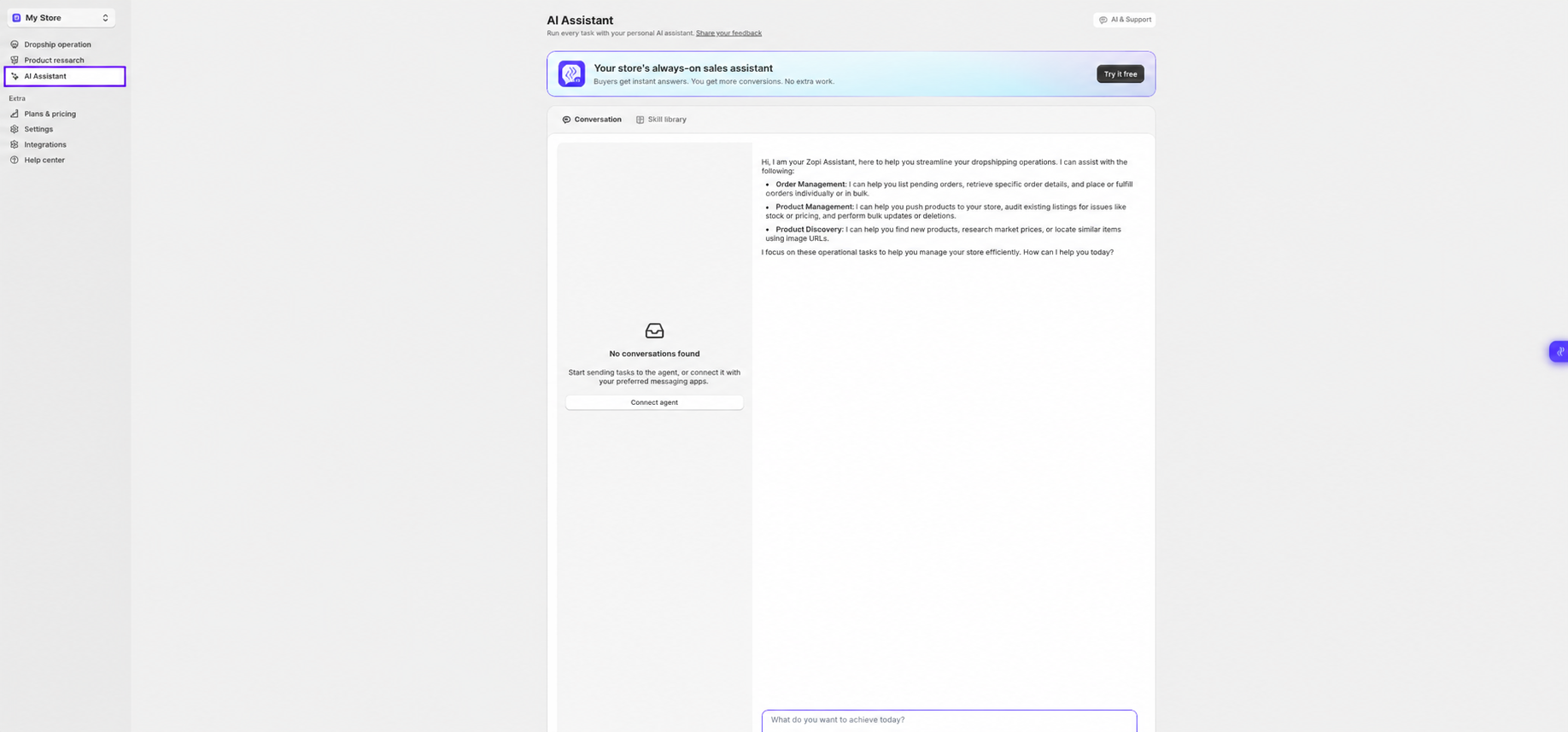
You can access AI Assistant from the left sidebar inside Zopi.

Path:
Zopi > AI Assistant

Direct link: https://ds.zopi.io/app/ai-assistant
What Can AI Assistant Help With?

Product Discovery

You can ask AI Assistant to:

  • Find trending products
  • Explore niches
  • Discover winning products
  • Find similar products

Examples:

  • “Find trending pet products”
  • “Show me beauty products with high demand”
  • “Find similar products to this item”

Product Management

AI Assistant can help:

  • Optimize product titles
  • Improve descriptions
  • Review product listings
  • Detect potential listing issues

Examples:

  • “Optimize this product title”
  • “Check this listing for issues”

Order Management

AI Assistant can assist with:

  • Order lookup
  • Pending order review
  • Tracking guidance
  • Fulfillment-related questions

Examples:

  • “Show pending orders”
  • “Help me to place this order”

How to Start Using AI Assistant

Step 1: Open AI Assistant

  • Go to AI Assistant from the left sidebar

Step 2: Start a Conversation

  • Type your request or question in the chat box

👉 You can ask:

  • Product questions
  • Order questions
  • Workflow guidance
  • Research requests

Step 3: Review AI Suggestions

  • AI Assistant will generate suggestions, recommendations, or operational guidance

👉 Depending on the task, the assistant may:

  • Recommend products
  • Explain workflows
  • Help troubleshoot issues

Example Prompts

Here are some prompts you can try:

Product Discovery

  • “Find trending home decor products”
  • “Show me viral beauty products”

Product Management

  • “Optimize this product description”
  • “Find issues with this product listing”

Order Management

  • “Show pending orders”
  • “Why is this order stuck in processing?”

Research

  • “Find winning products for summer”
  • “Analyze this niche”

Best Practices

  • Use clear and specific prompts
  • Mention product category or niche when possible
  • Ask one task at a time for better results
  • Use AI Assistant together with Product Research tools for deeper insights

Need Help?

If you need assistance while using Zopi:

👉 Our team is available to help you resolve issues quickly and keep your orders running smoothly.

Related articles

How AI Assistant Helps Manage Orders

Zopi AI Assistant helps simplify order management by assisting with operational tasks directly inside Zopi. Instead of manually checking and processing orders one by one, you can ask the assistant to help retrieve order information, review pending orders, and support fulfillment workflows. 👉 AI Assistant focuses on helping you manage orders faster and more efficiently….

How to Connect Zopi AI Assistan

Zopi AI Assistant can be connected through multiple messaging channels, allowing you to interact with the assistant using your preferred platform. Currently, you can connect the assistant using: Zopi Built-in Chat Telegram WhatsApp 👉 Once connected, you can send operational tasks directly to the assistant. Access AI Assistant To access AI Assistant: Open Zopi Click…

What Can Zopi AI Assistant Help You With?

Zopi AI Assistant is an operational assistant designed to help you manage your dropshipping workflow more efficiently. Instead of manually navigating through multiple pages and actions, you can ask the assistant to help perform operational tasks directly inside Zopi. 👉 AI Assistant focuses on: Order management Product management Product discovery It is designed to help…

Subscribe
Notify of
guest

0 Comments
Inline Feedbacks
View all comments

Table of contents

What Is Zopi AI Assistant?Access AI AssistantWhat Can AI Assistant Help With?Product DiscoveryProduct ManagementOrder ManagementHow to Start Using AI AssistantStep 1: Open AI AssistantStep 2: Start a ConversationStep 3: Review AI SuggestionsExample PromptsProduct DiscoveryProduct ManagementOrder ManagementResearchBest PracticesNeed Help?

Related articles

How AI Assistant Helps Manage Orders

Zopi AI Assistant helps simplify order management by assisting with operational tasks directly inside Zopi. Instead of manually checking and processing orders one by one, you can ask the assistant to help retrieve order information, review pending orders, and support fulfillment workflows. 👉 AI Assistant focuses on helping you manage orders faster and more efficiently….

What Can Zopi AI Assistant Help You With?

Zopi AI Assistant is an operational assistant designed to help you manage your dropshipping workflow more efficiently. Instead of manually navigating through multiple pages and actions, you can ask the assistant to help perform operational tasks directly inside Zopi. 👉 AI Assistant focuses on: Order management Product management Product discovery It is designed to help…

How to Connect Zopi AI Assistan

Zopi AI Assistant can be connected through multiple messaging channels, allowing you to interact with the assistant using your preferred platform. Currently, you can connect the assistant using: Zopi Built-in Chat Telegram WhatsApp 👉 Once connected, you can send operational tasks directly to the assistant. Access AI Assistant To access AI Assistant: Open Zopi Click…

Share your thought