Order Center

How to View Order Details in Zopi

Update on: 07/05/2026

Table of contents

Where to Find Orders in ZopiHow to View Order Details (Step-by-Step)Step 1: Open Orders PageStep 2: Find Your OrderStep 3: Open Order DetailsStep 4: Review Order InformationWhat Information You Can See1. Customer Information2. Product Information3. Order Status4. Supplier Details5. Tracking Information (if fulfilled)6. Payment DetailsHow to Use Order Details in Your WorkflowBest PracticesConclusionNeed Help?

Viewing order details helps you track fulfillment, check customer info, and fix issues quickly. This is essential for managing your orders smoothly.

Where to Find Orders in Zopi

All your orders are managed in one place:

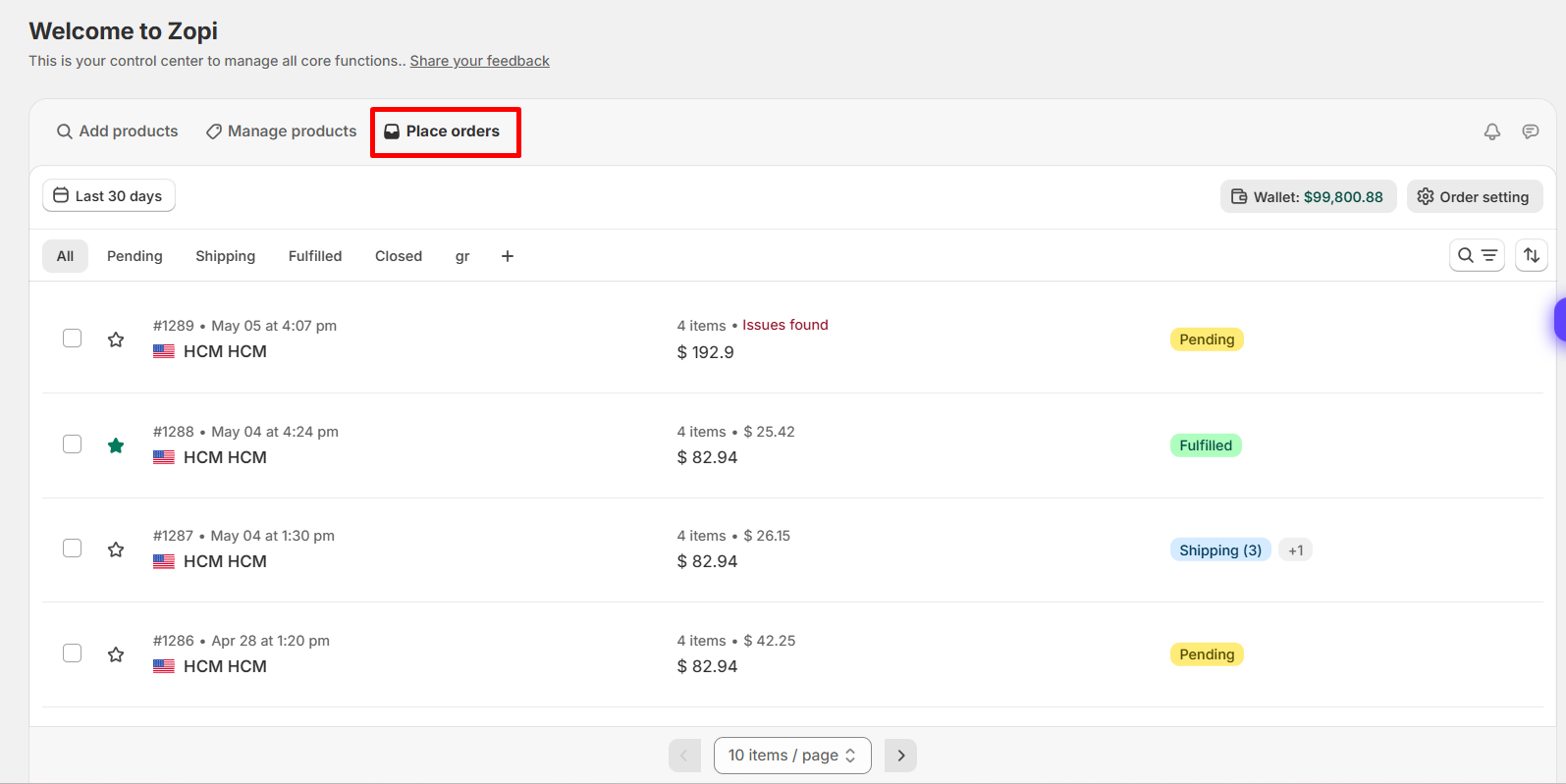
  • Go to: Zopi > Place Orders

Here you will see:

  • All incoming Shopify orders
  • Order status (Pending, Fulfilled, Failed, etc.)
  • Payment and fulfillment status

How to View Order Details (Step-by-Step)

Follow these steps:

Step 1: Open Orders Page

  • Navigate to: Zopi > Place Orders

Step 2: Find Your Order

  • Use search or filters:
    • Order number
    • Customer name
    • Order status

Step 3: Open Order Details

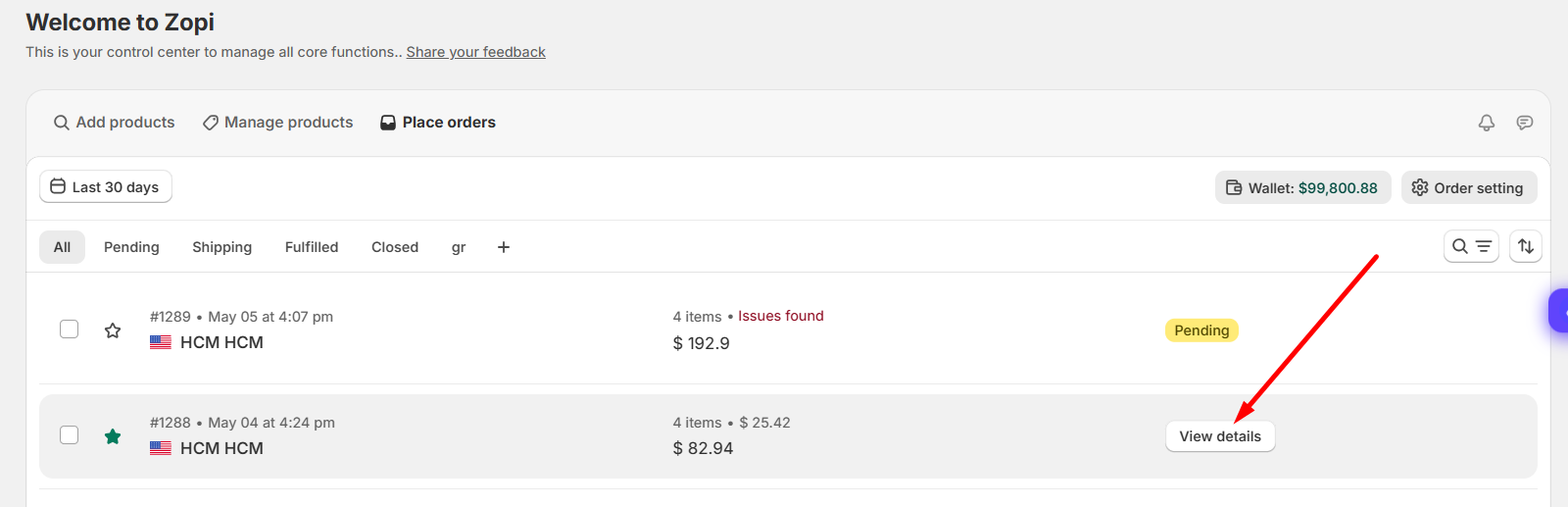
  • Click on the order row or View Details 
Step 4: Review Order Information

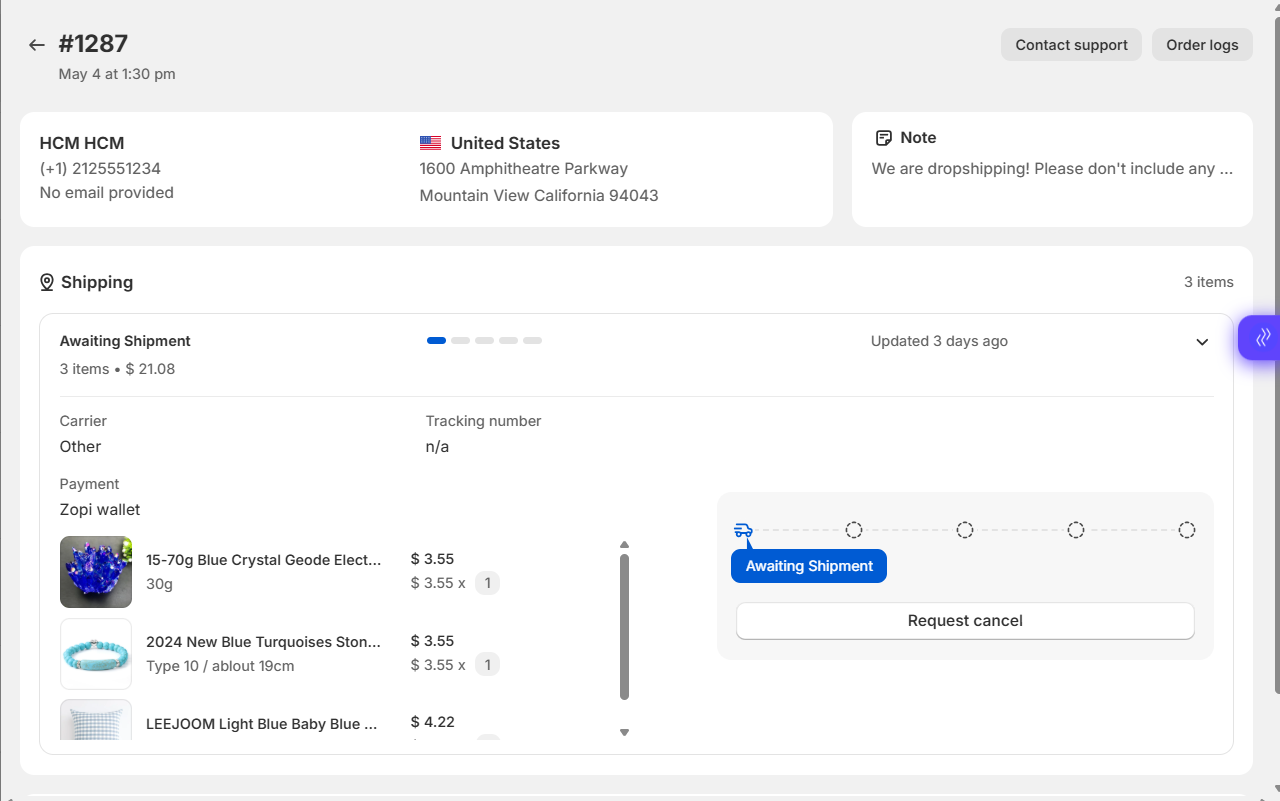
You will now see full order details (explained below)
What Information You Can See

Inside the order detail page, you can check:

1. Customer Information

  • Name
  • Shipping address
  • Contact details

2. Product Information

  • Product name
  • Variants (size, color, etc.)
  • Quantity ordered

3. Order Status

  • Payment status
  • Fulfillment status
  • Supplier status

4. Supplier Details

  • Linked supplier (AliExpress, etc.)
  • Product mapping
  • Cost price

5. Tracking Information (if fulfilled)

  • Tracking number
  • Shipping carrier
  • Delivery updates

6. Payment Details

  • Payment status (Paid / Failed)
  • Order cost

How to Use Order Details in Your Workflow

Order details are used throughout your workflow:

  1. Check new orders
    → Confirm customer info
  2. Fulfill orders
    → Click Order or Fulfill
  3. Handle issues
    → Identify payment failures or mapping issues
  4. Track shipments
    → Monitor delivery progress

Best Practices

  • Check orders daily to avoid delays
  • Always confirm customer address before fulfillment
  • Review product mapping before placing orders
  • Use filters to quickly find problematic orders
  • Monitor failed or pending orders closely

Conclusion

Viewing order details in Zopi helps you manage fulfillment, track shipments, and resolve issues quickly.

Make it a habit to review your orders regularly to keep your dropshipping operation running smoothly.

Need Help?

If you need assistance while using Zopi:

👉 Our team is available to help you resolve issues quickly and keep your orders running smoothly.

Related articles

Understanding Shipping Options and Times for Your Dropshipping Business

In the dropshipping business model, shipping plays a pivotal role that requires careful consideration. This article explores common shipping options and their typical delivery times, guiding you in selecting the best methods to enhance your customers’ shipping experience. Understanding shipping logistics is essential for maintaining customer satisfaction and loyalty, making it a critical aspect of…

How to Cancel a Temu Order & Request a Refund (Step-by-Step Guide)

Order cancellations and refund requests are common when dropshipping with Temu — especially when customers change their minds or orders are delayed. Instead of manually handling cancellations and returns on Temu, you can use Zopi Instant Fulfillment to process orders faster and reduce these issues altogether. This guide explains: When you need to cancel or…

Change the Quantity of an Order

If your customer wants to change the order quantity after it has been received in your store, please follow the solutions below before placing the order in Zopi. How to Change the Quantity of an Order To effectively change the quantity of an order, you will need to make adjustments directly in your Shopify store….

Subscribe
Notify of
guest

0 Comments
Inline Feedbacks
View all comments

Table of contents

Where to Find Orders in ZopiHow to View Order Details (Step-by-Step)Step 1: Open Orders PageStep 2: Find Your OrderStep 3: Open Order DetailsStep 4: Review Order InformationWhat Information You Can See1. Customer Information2. Product Information3. Order Status4. Supplier Details5. Tracking Information (if fulfilled)6. Payment DetailsHow to Use Order Details in Your WorkflowBest PracticesConclusionNeed Help?

Related articles

Enable Order Update Emails on Shopify

If you have received tracking numbers from your suppliers, you can easily send fulfillment notification emails to your customers. Follow these steps to enable order update emails on Shopify: How to Enable Order Update Emails on Shopify From your Shopify admin, go to Settings. Select Notifications. Click on Customer notifications. Click the name of the…

Get the Source Order Number

After placing an order, obtaining the supplier order number is essential for effective tracking. Remember, this number may vary depending on the supplier platforms you are using. Understanding Multi-source Order Numbers I. AliExpress Order Number AliExpress Order Numbers typically appear as follows: 502370139095420, 70050660905420, 86087307282773. To locate your order number on AliExpress, follow these steps:…

Cancel An Order and Refund/Return Policy on AliExpress

Sometimes, you may need to cancel a dropshipping order. This could be due to a customer changing their mind or discovering that your supplier is out of stock. Here’s how to cancel an order on AliExpress and handle refund requests. How to Cancel an Order from AliExpress Steps to Cancel an Order successfully cancel an…

Share your thought