
This guide shows you how to place (fulfill) orders in Zopi Simple Mode. You can either pay using your Zopi Wallet or complete payment directly on AliExpress using your own account.
Access Orders in Zopi
You can access and manage your orders in Zopi using either Shopify Admin or the Zopi Web App.
Option 1: Access via Shopify Admin
- Go to Shopify Admin
- Find Zopi Dropshipping
- Select the Place orders tab
Option 2: Access via Zopi Web App
- Go to: https://ds.zopi.io/app/orders
- Log in to your Zopi account (if required)
- Select the Place orders tab
Both methods will take you to the same Orders dashboard, where you can:
- View all orders
- Filter by status (Pending, Shipping, etc.)
- Place and manage orders
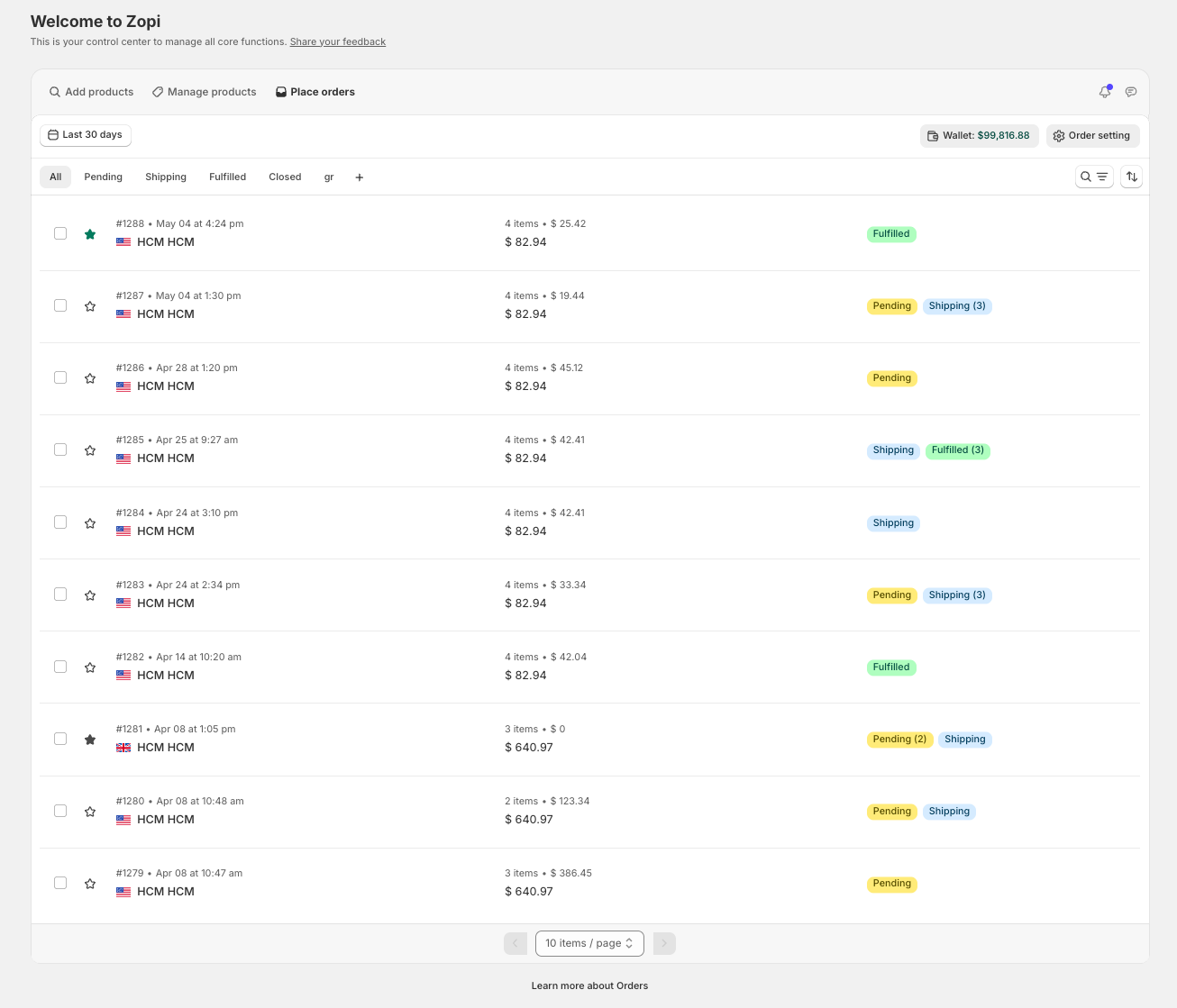
Understand Order Statuses
- Pending → Ready to place order
- Shipping → Supplier has shipped
- Fulfilled → Completed with tracking
- Closed → Finished or manually closed
👉 Focus on Pending orders to take action.
Place Orders Step-by-Step
Step 1: Open Pending Orders
- Go to Place orders
- Select Pending
Step 2: Select Orders
- Tick the orders you want to fulfill
Step 3: Click Make Fulfillment Button
- Open the Confirm & Place screen
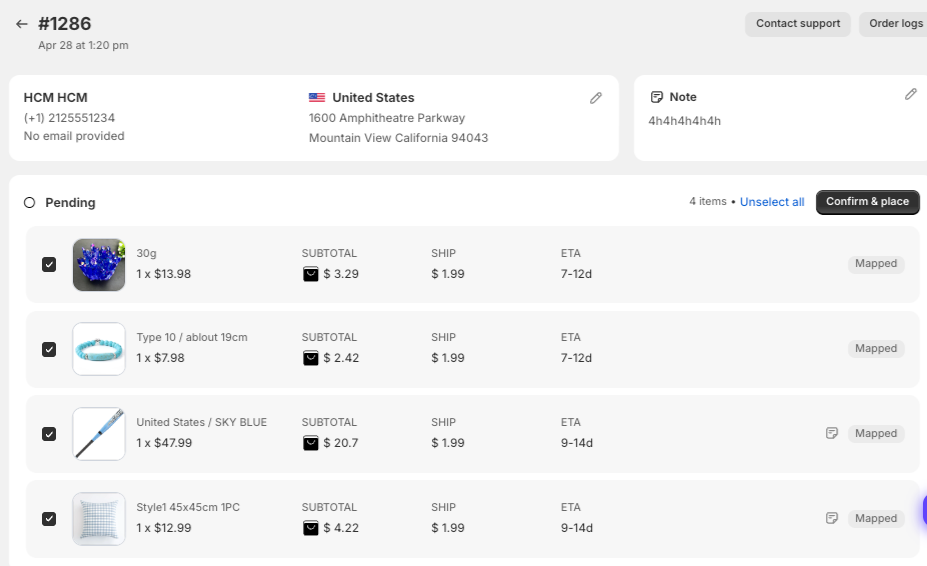
Payment Methods (Zopi Wallet vs AliExpress)
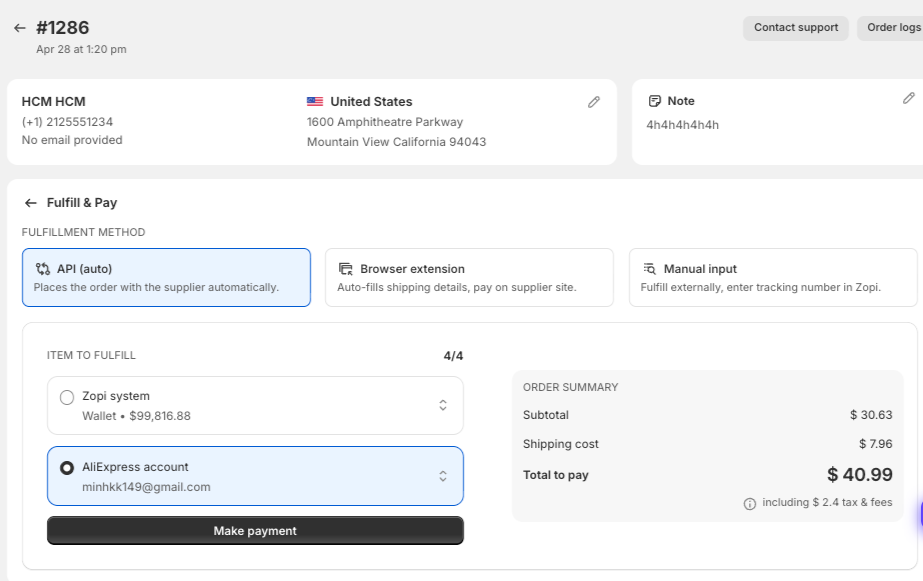
When placing an order, you will see multiple fulfillment options:
Option 1: API (Auto) – Automatic Fulfillment
- Select API (auto)
- Choose:
- Zopi Wallet → pay directly via Zopi
- AliExpress account → use your linked AE account
How it works:
- Zopi automatically places the order with the supplier
- If using AliExpress account, the system will process the order using your account
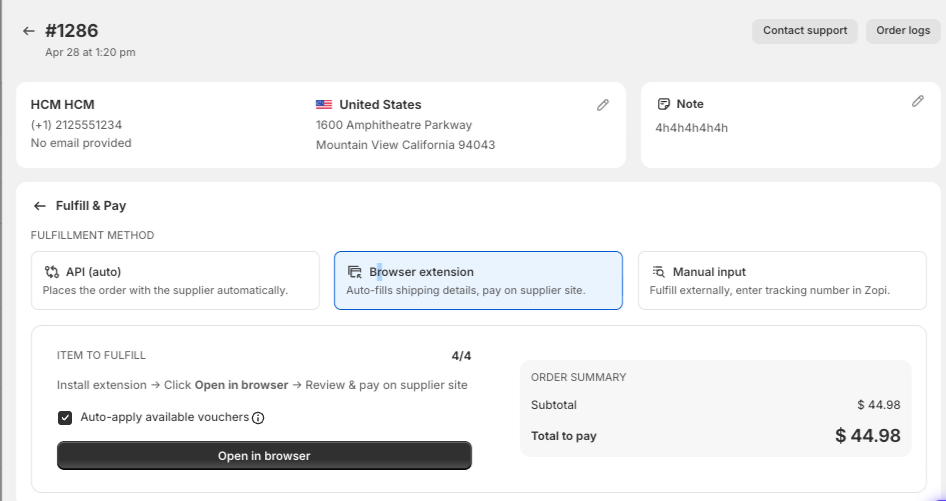
Option 2: Browser Extension (Manual Checkout on AliExpress)
- Select Browser extension
- (If prompted) Install the Zopi extension via this link
- Click Open in browser
👉 Zopi will:
- Open the supplier page (e.g. AliExpress)
- Auto-fill customer shipping details
- Apply available vouchers (if enabled)
Complete Payment on AliExpress
- Review the order on AliExpress
- Confirm product, shipping method, and price
- Complete payment using your AliExpress account
After payment:
- Order will be synced back to Zopi
- Status will update automatically
Notes
- Make sure you are logged into the correct AliExpress account
- Do not close the browser before completing payment
- If the extension is not installed, you will be prompted to install it
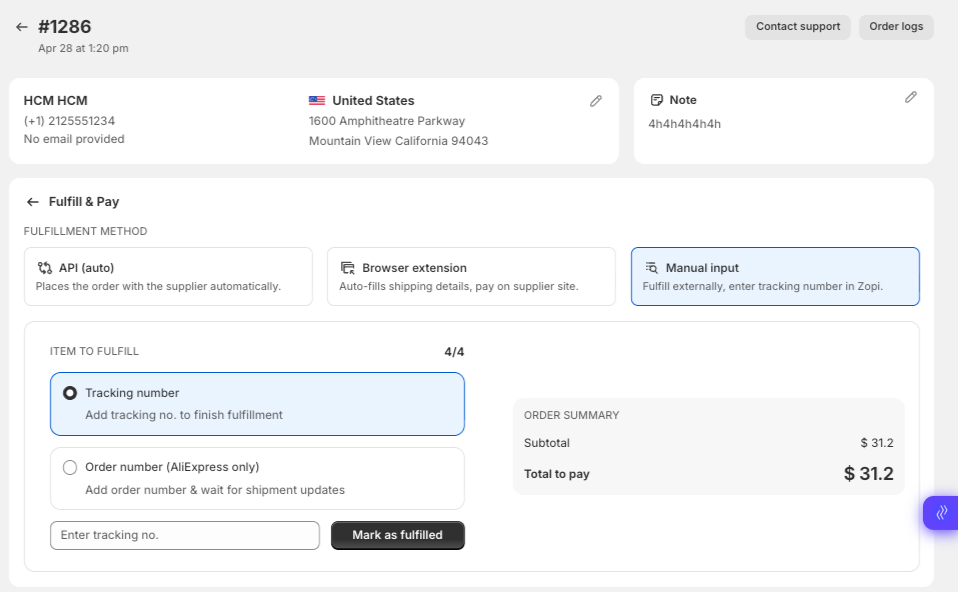
Option 3: Manual Input
- Select Manual input
- Place an order outside Zopi
- Enter the tracking number back into Zopi
Best for:
- Unsupported suppliers
- Custom workflows
Best Practices
- Use Zopi Wallet for automation and speed
- Use AliExpress payment when you need discounts or manual control
- Always verify:
- Shipping address
- Product variant
- Supplier availability
Need Help?
If you need assistance while using Zopi:
- Contact our support team via Live Chat inside Zopi
- Visit the Zopi Help Center for more guides
- Join the Zopi Community to ask questions and learn from other users
👉 Our team is available to help you resolve issues quickly and keep your orders running smoothly.