My Channel What is Zopi? - All-in-one Dropshipping solution

How to Connect Your Store to Zopi

Update on: 21/01/2026

Table of contents

Why You Should Connect Your StoreSupported Store PlatformsStep-by-Step: Connect Your StoreStep 1: Open the Connect Store screenStep 2: Choose your store platformStep 3: Enter your store domainStep 4: Approve the connectionStep 5: Return to ZopiWhat to Do NextNeed Help?

Connecting your store helps you get the most out of Zopi. Once connected, Zopi becomes your central hub for managing products, orders, and fulfillment — so you can spend less time on manual work and more time growing your business.


Why You Should Connect Your Store

After connecting your store, you’ll be able to:

  • Import and push products faster without manual listing

  • Sync orders automatically into Zopi Order Center

  • Manage fulfillment in one place, from supplier mapping to tracking updates

  • Reduce errors and missed orders with clearer workflows

  • Save time every day by keeping everything in a single dashboard


Supported Store Platforms

Zopi currently supports:

  • ✅ Shopify

  • ✅ WooCommerce

  • ✅ BigCommerce

Other platforms are Coming soon.

  • ⏳ Amazon

  • ⏳ eBay

  • ⏳ Etsy

  • ⏳ Wix

  • ⏳ TikTok Shop

  • ⏳ Squarespace


Step-by-Step: Connect Your Store

Step 1: Open the Connect Store screen

  • In Zopi, click Connect now from the top banner

  • You’ll be redirected to the Connect store page.
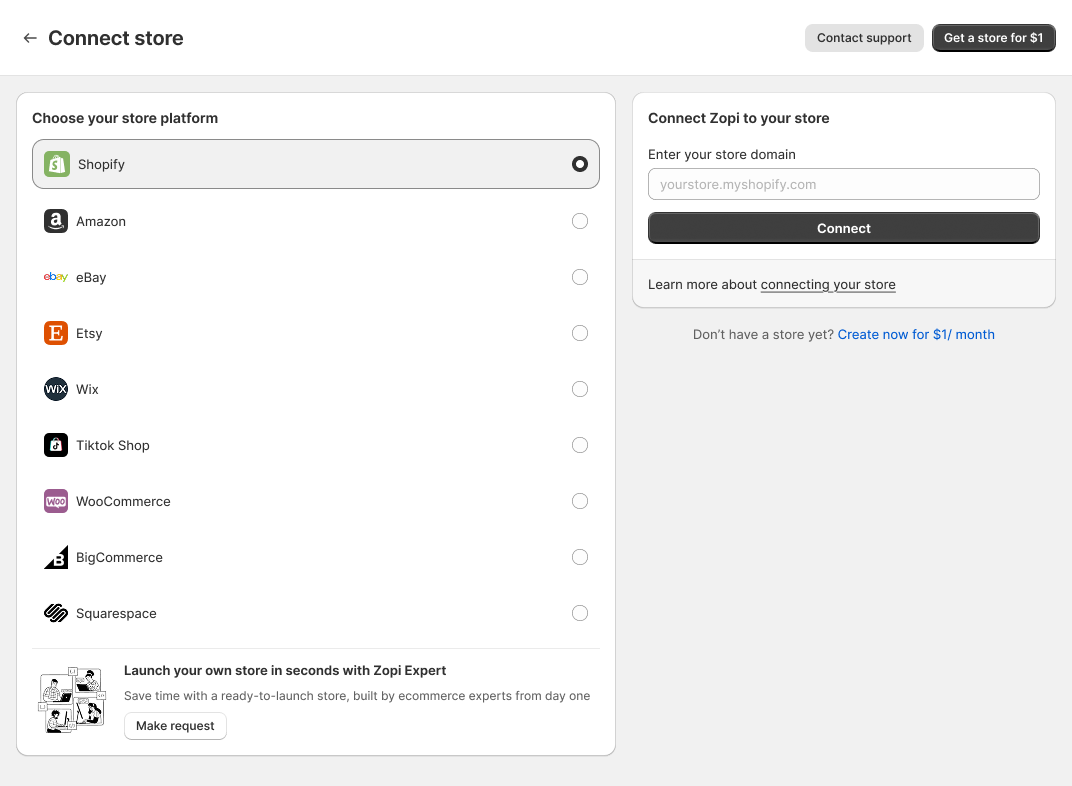
Step 2: Choose your store platform

Select your store platform (Shopify / WooCommerce / BigCommerce).

Step 3: Enter your store domain

In the Enter your store domain field, input your store domain, then click Connect.

Step 4: Approve the connection

You may be redirected to your platform to confirm installation/permissions.
Click Install / Approve to complete the connection.

Displaying detail.png

Step 5: Return to Zopi

After a successful setup, you’ll be redirected back to Zopi automatically.
✅ Your store is now connected.


What to Do Next

  • Once connected, you can:

    • Start importing products right away

    • Push products live to your store

    • Sync and fulfill orders in Zopi Order Center


Need Help?

If you run into any issues while connecting, contact Zopi Support via Live Chat. Our team is happy to help you get set up.

Related articles

Get started with Zopi

Zopi offers an automated dropshipping solution equipped with both standard and advanced features. To effectively optimize and enhance your dropshipping business, follow the steps outlined below to get started. How to Create Your Zopi Account 1. Install the Zopi App You can install Zopi directly from your Shopify store. Once the installation is complete, a…

How to Use Zopi’s Workaround Method for Unsupported Sales Channels

Some sales channels are not yet available for direct connection in Zopi. In the meantime, you can still sell and fulfill orders using Zopi through the Workaround Method (import/export workflow).   This method is useful when you want to: Sell products on marketplaces or custom channels Fulfill orders with Zopi without a direct integration Keep…

Switch your AliExpress account

Zopi enables you to easily change your connected AliExpress account whenever needed. Please note that switching to a new AliExpress account will result in Zopi ceasing to sync order data between your previous and new accounts. How to Change Your AliExpress Account There are two effective methods to switch to a new AliExpress account. Follow…

Subscribe
Notify of
guest

0 Comments
Inline Feedbacks
View all comments

Table of contents

Why You Should Connect Your StoreSupported Store PlatformsStep-by-Step: Connect Your StoreStep 1: Open the Connect Store screenStep 2: Choose your store platformStep 3: Enter your store domainStep 4: Approve the connectionStep 5: Return to ZopiWhat to Do NextNeed Help?

Related articles

Link Zopi with your AliExpress account

To efficiently place orders on AliExpress and synchronize product and order data, you need to link your Zopi account with your AliExpress account. Method 1: In the Account Menu Steps to Connect Your AliExpress Account via the Account Menu Log in to Zopi. Navigate to the Settings & Billing page and select Account. Locate the…

Getting Started with Zopi Extension 2025

Zopi Extension is your essential tool for achieving success in dropshipping. With in-depth insights from Shopify store analysis and detailed AliExpress data, you can stay ahead in your niche and make informed decisions. The Zopi Extension simplifies product research, store analysis, and sales tracking like never before. Getting Started with Zopi Extension To optimize your…

How to Use Zopi’s Workaround Method for Unsupported Sales Channels

Some sales channels are not yet available for direct connection in Zopi. In the meantime, you can still sell and fulfill orders using Zopi through the Workaround Method (import/export workflow).   This method is useful when you want to: Sell products on marketplaces or custom channels Fulfill orders with Zopi without a direct integration Keep…

Share your thought