Order Center What is Zopi? - All-in-one Dropshipping solution

How to Place Orders in Zopi (Simple Mode)

Update on: 07/05/2026

Table of contents

Access Orders in ZopiOption 1: Access via Shopify AdminOption 2: Access via Zopi Web AppUnderstand Order StatusesPlace Orders Step-by-StepStep 1: Open Pending OrdersStep 2: Select OrdersStep 3: Click Make Fulfillment ButtonPayment Methods (Zopi Wallet vs AliExpress)Option 1: API (Auto) – Automatic FulfillmentOption 2: Browser Extension (Manual Checkout on AliExpress)Complete Payment on AliExpressNotesOption 3: Manual InputBest PracticesNeed Help?

This guide shows you how to place (fulfill) orders in Zopi Simple Mode. You can either pay using your Zopi Wallet or complete payment directly on AliExpress using your own account.

Access Orders in Zopi

You can access and manage your orders in Zopi using either Shopify Admin or the Zopi Web App.

Option 1: Access via Shopify Admin

  1. Go to Shopify Admin
  2. Find Zopi Dropshipping
  3. Select the Place orders tab

Option 2: Access via Zopi Web App

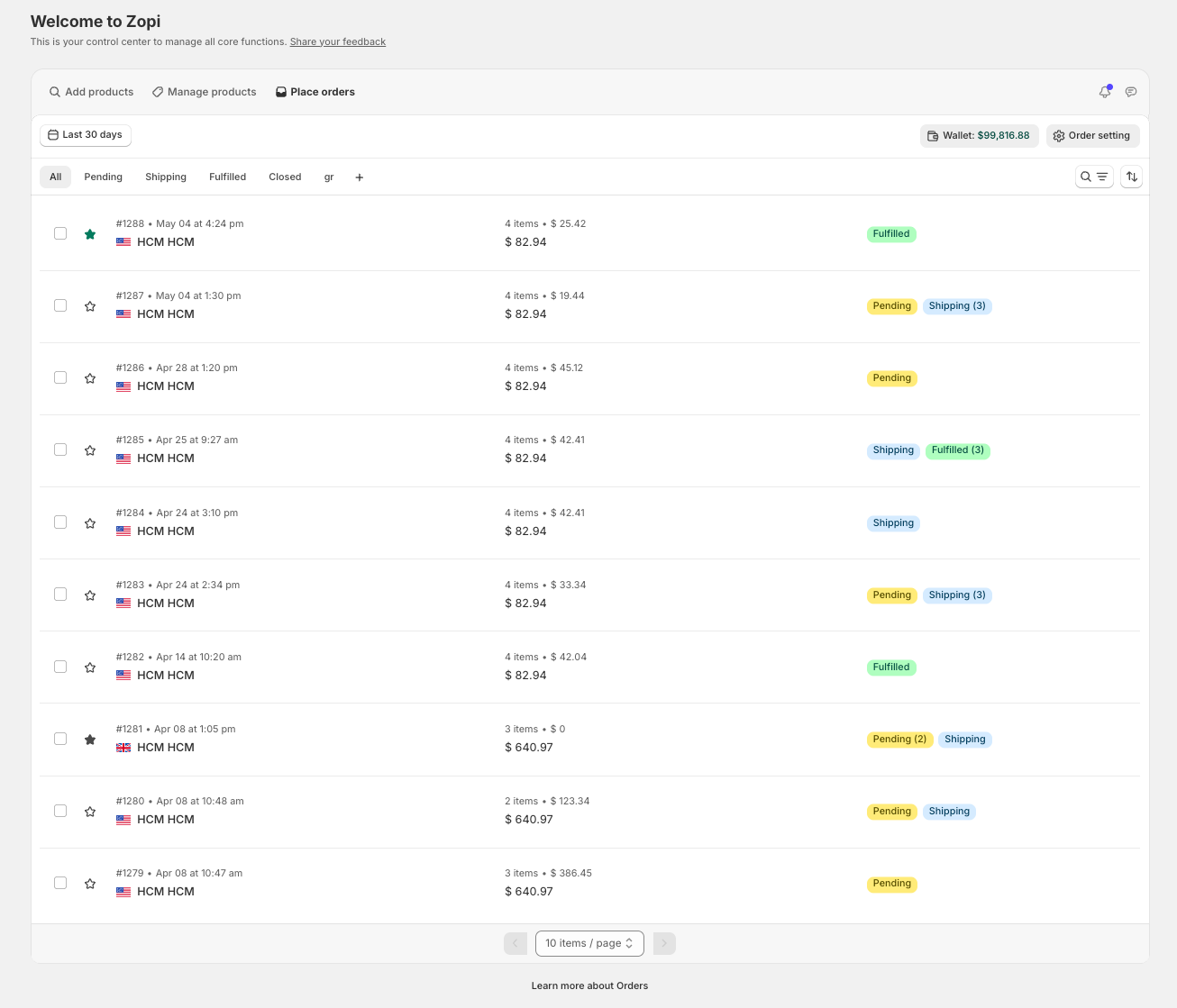
Both methods will take you to the same Orders dashboard, where you can:

  • View all orders
  • Filter by status (Pending, Shipping, etc.)
  • Place and manage orders

Understand Order Statuses

  • Pending → Ready to place order
  • Shipping → Supplier has shipped
  • Fulfilled → Completed with tracking
  • Closed → Finished or manually closed

👉 Focus on Pending orders to take action.

Place Orders Step-by-Step

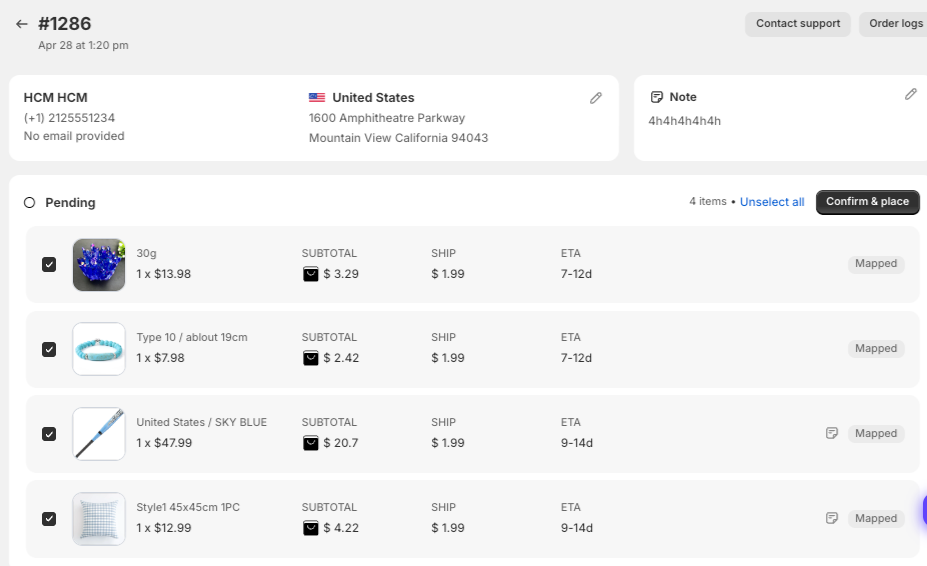
Step 1: Open Pending Orders

  • Go to Place orders
  • Select Pending

Step 2: Select Orders

  • Tick the orders you want to fulfill

Step 3: Click Make Fulfillment Button

  • Open the Confirm & Place screen

Payment Methods (Zopi Wallet vs AliExpress)

When placing an order, you will see multiple fulfillment options:

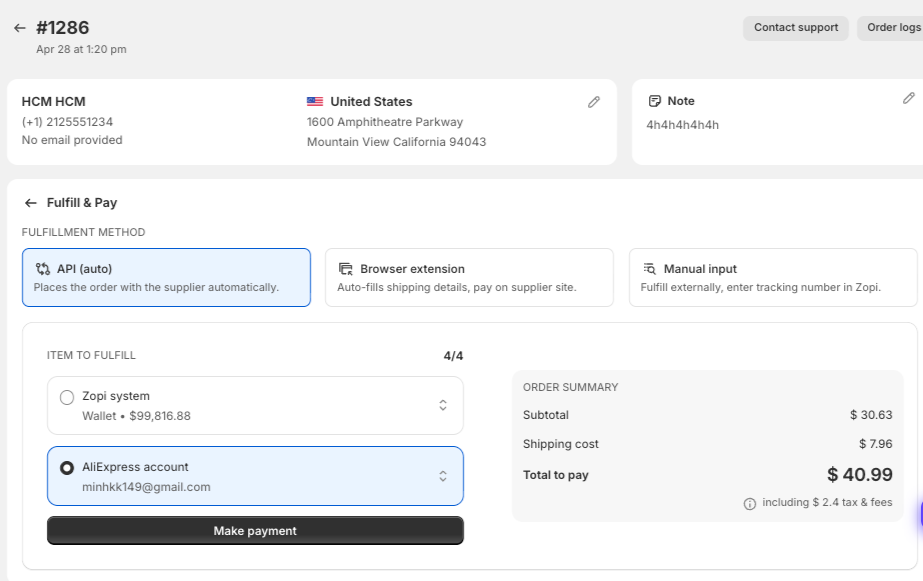
Option 1: API (Auto) – Automatic Fulfillment

  • Select API (auto)
  • Choose:
    • Zopi Wallet → pay directly via Zopi
    • AliExpress account → use your linked AE account

How it works:

  • Zopi automatically places the order with the supplier
  • If using AliExpress account, the system will process the order using your account
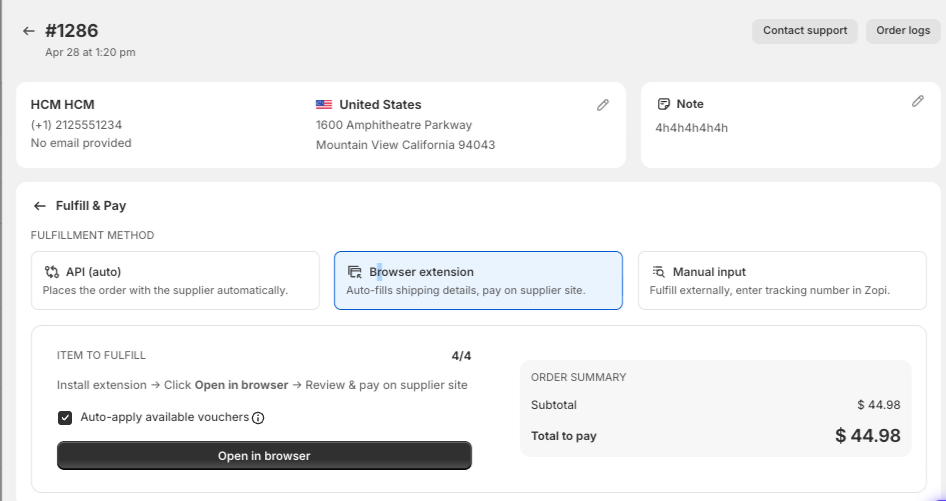
Option 2: Browser Extension (Manual Checkout on AliExpress)

  • Select Browser extension
  • (If prompted) Install the Zopi extension via this link 
  • Click Open in browser

👉 Zopi will:

  • Open the supplier page (e.g. AliExpress)
  • Auto-fill customer shipping details
  • Apply available vouchers (if enabled)

Complete Payment on AliExpress

  • Review the order on AliExpress
  • Confirm product, shipping method, and price
  • Complete payment using your AliExpress account
After payment:

  • Order will be synced back to Zopi
  • Status will update automatically

Notes

  • Make sure you are logged into the correct AliExpress account
  • Do not close the browser before completing payment
  • If the extension is not installed, you will be prompted to install it

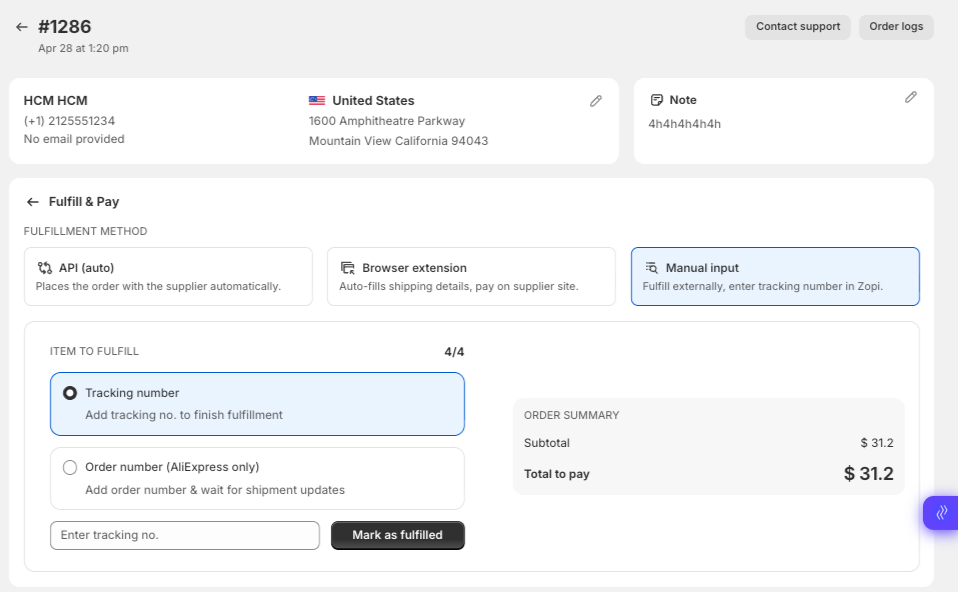
Option 3: Manual Input

  • Select Manual input
  • Place an order outside Zopi
  • Enter the tracking number back into Zopi
    Best for:
  • Unsupported suppliers
  • Custom workflows

Best Practices

  • Use Zopi Wallet for automation and speed
  • Use AliExpress payment when you need discounts or manual control
  • Always verify:
    • Shipping address
    • Product variant
    • Supplier availability

Need Help?

If you need assistance while using Zopi:

👉 Our team is available to help you resolve issues quickly and keep your orders running smoothly.

Related articles

Set Default Message to AliExpress Suppliers

When placing orders, you may have specific requirements for your suppliers. Utilize the Set Default Message to Supplier feature to communicate directly with your supplier during the ordering process. Please note that this feature is exclusively available for AliExpress as the order source. Follow the steps below to set it up effectively. How to Set…

What is Zopi?

Are you new to the dropshipping industry and feeling overwhelmed? It’s time to kickstart your onboarding process! Let us guide you through everything you need to know about Zopi – your ultimate dropshipping companion. About Zopi Zopi, formerly known as Ali Orders, is an automated dropshipping solution designed to streamline your dropshipping experience. From product…

Understanding Shipping Options and Times for Your Dropshipping Business

In the dropshipping business model, shipping plays a pivotal role that requires careful consideration. This article explores common shipping options and their typical delivery times, guiding you in selecting the best methods to enhance your customers’ shipping experience. Understanding shipping logistics is essential for maintaining customer satisfaction and loyalty, making it a critical aspect of…

Subscribe
Notify of
guest

0 Comments
Inline Feedbacks
View all comments

Table of contents

Access Orders in ZopiOption 1: Access via Shopify AdminOption 2: Access via Zopi Web AppUnderstand Order StatusesPlace Orders Step-by-StepStep 1: Open Pending OrdersStep 2: Select OrdersStep 3: Click Make Fulfillment ButtonPayment Methods (Zopi Wallet vs AliExpress)Option 1: API (Auto) – Automatic FulfillmentOption 2: Browser Extension (Manual Checkout on AliExpress)Complete Payment on AliExpressNotesOption 3: Manual InputBest PracticesNeed Help?

Related articles

Set Up Notifications in Zopi

Keeping track of your supplier products and orders is essential for smooth operations. With the Zopi Notification feature, you can receive real-time updates about important information related to products, suppliers, and orders. Here’s what’s new in notifications as of March 25, 2024. A New Look User Interface The user interface (UI) has been redesigned for…

Get started with Zopi

Zopi offers an automated dropshipping solution equipped with both standard and advanced features. To effectively optimize and enhance your dropshipping business, follow the steps outlined below to get started. How to Create Your Zopi Account 1. Install the Zopi App You can install Zopi directly from your Shopify store. Once the installation is complete, a…

Fulfill Pending Orders – Setting Your Triggers (WHEN Rules)

Triggers are essential for determining when an automation flow should begin. In the “Fulfill Pending Orders” workflow, Zopi automatically reviews each new or pending order to assess if it can be fulfilled using the available suppliers and fulfillment options.   How It Works When a new order is synced to Zopi or a fulfillment request…

Share your thought