Imported & Push to store

How to Import Products from AliExpress via Link in Zopi

Update on: 07/05/2026

Table of contents

When to Use This MethodStep-by-Step: Import via AliExpress LinkStep 1: Copy the product linkStep 2: Paste link into ZopiPush Settings ExplainedStep 3: Push to your storeWhat Happens After PushingBest PracticesConclusionNeed Help?

Importing products by link is the fastest way to bring a product you found on AliExpress into your Shopify store. This helps you move quickly from product discovery to selling.

When to Use This Method

Use this method when:

  • You are browsing AliExpress and find a potential product
  • You already have a product URL
  • You want a quick and simple import workflow
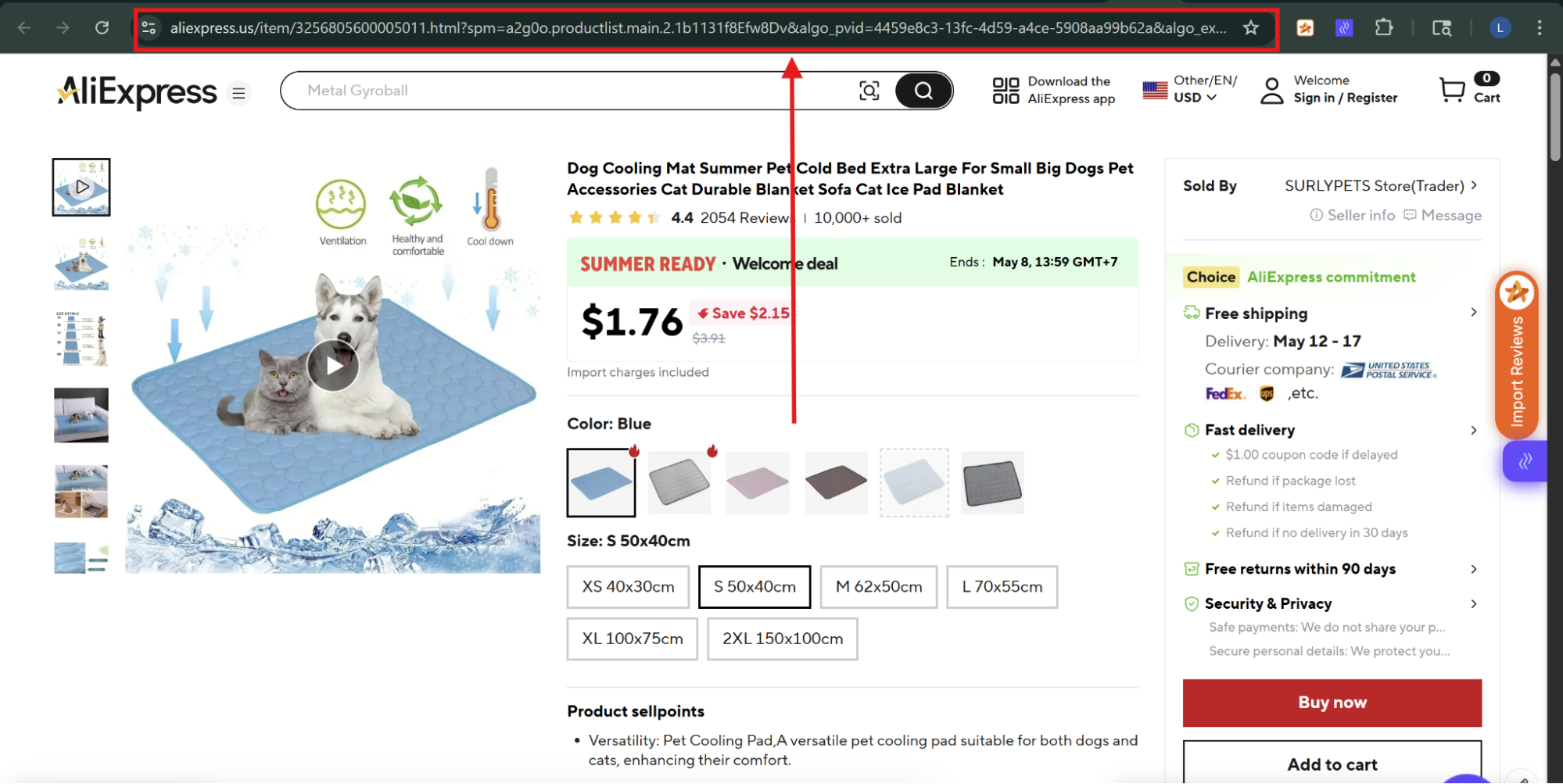
  • Go to AliExpress
  • Open the product page
  • Copy the URL from your browser

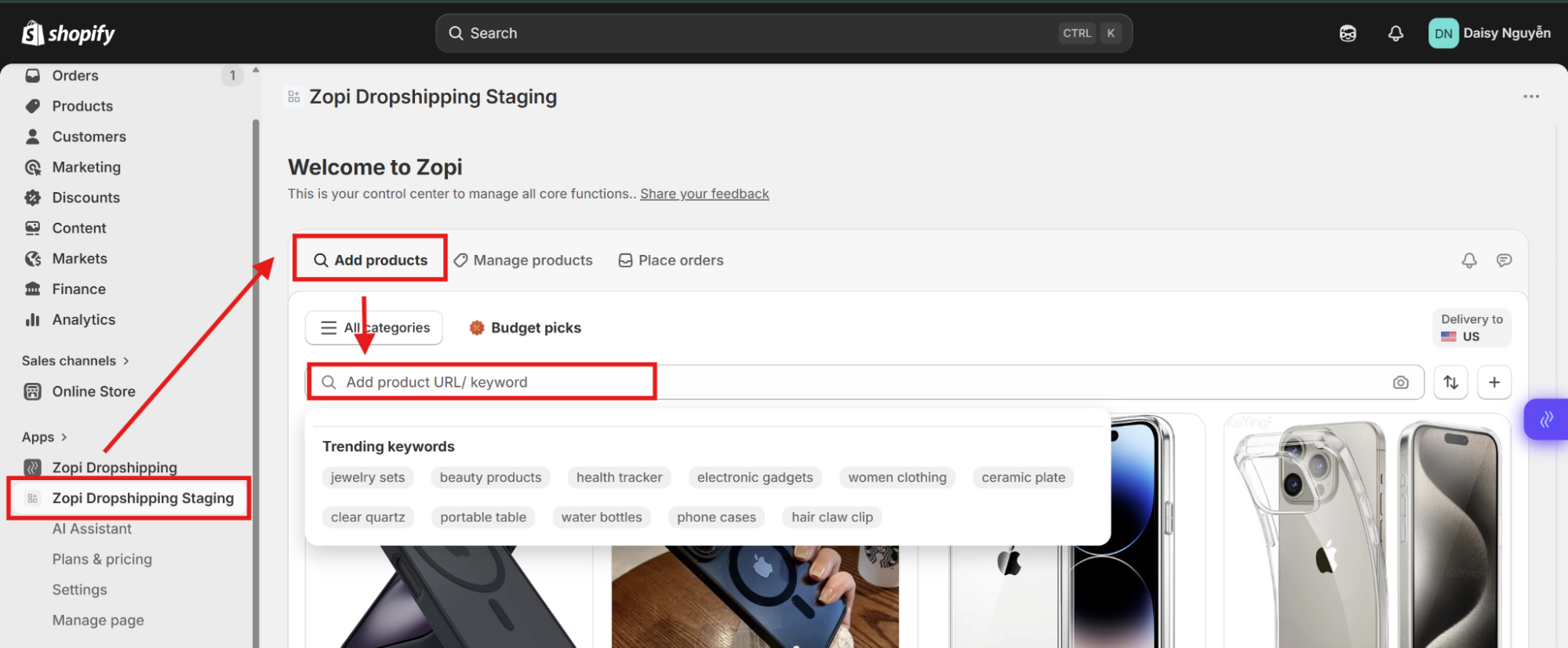
  • Open Zopi inside Shopify
  • Go to: Zopi > Add products
  • Paste the link into the search bar
  • Press Enter
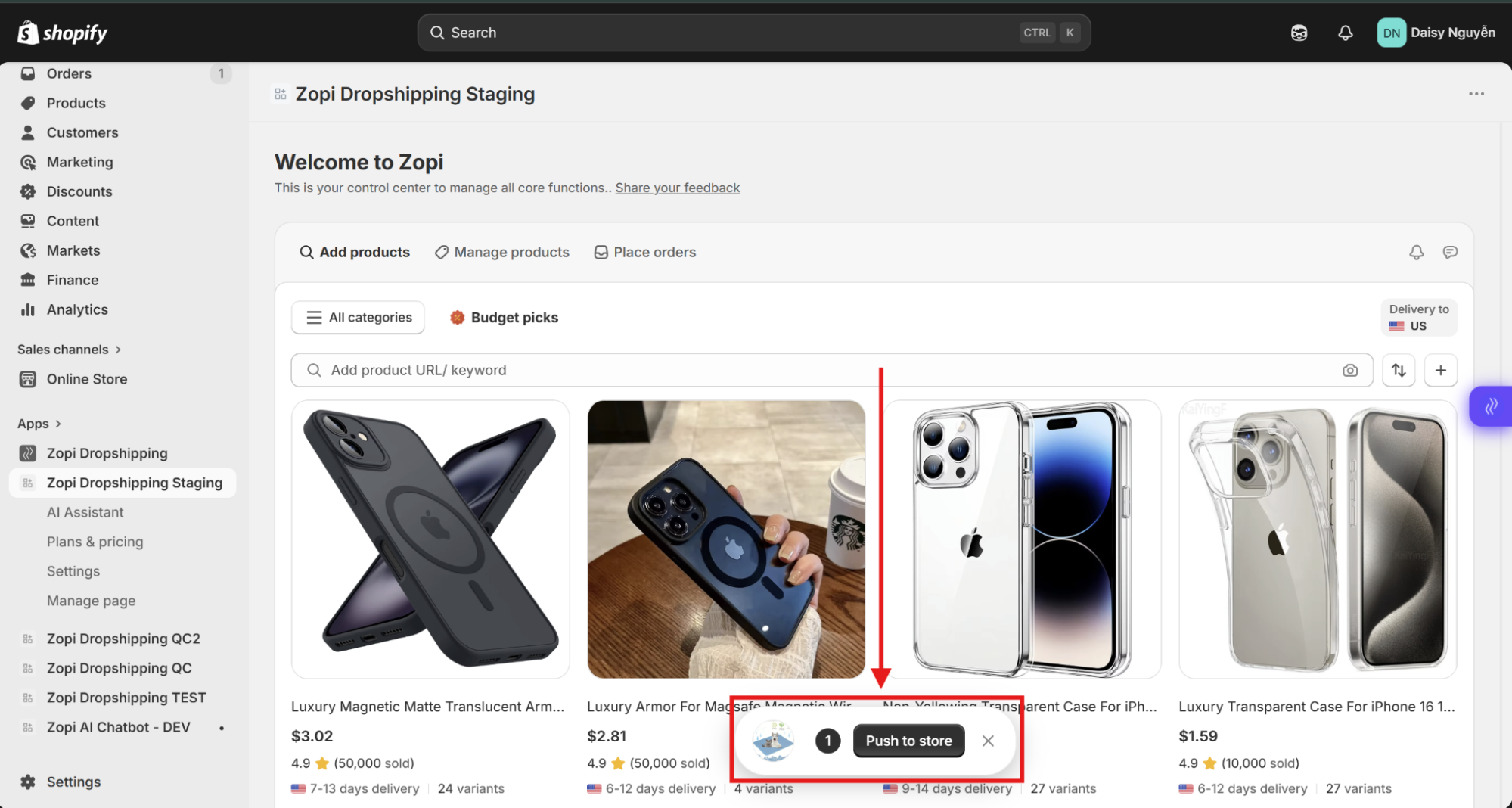
  • Click Push to store

Push Settings Explained

Before pushing the product to your store, Zopi allows you to customize several settings on the right panel:

  • Product status
    • Active: Product is live immediately
    • Draft: Product is hidden until you publish it
  • When product out of stock
    • Keep selling: Continue accepting orders
    • Stop: Disable purchase when out of stock
  • Set price
    • Auto: Apply your pricing rules
    • Manual: Set your own price
  • Set content
    • Keep original: Use supplier content
    • AI enhance: Improve title and description automatically

👉 You can adjust these settings based on your selling strategy.

Step 3: Push to your store

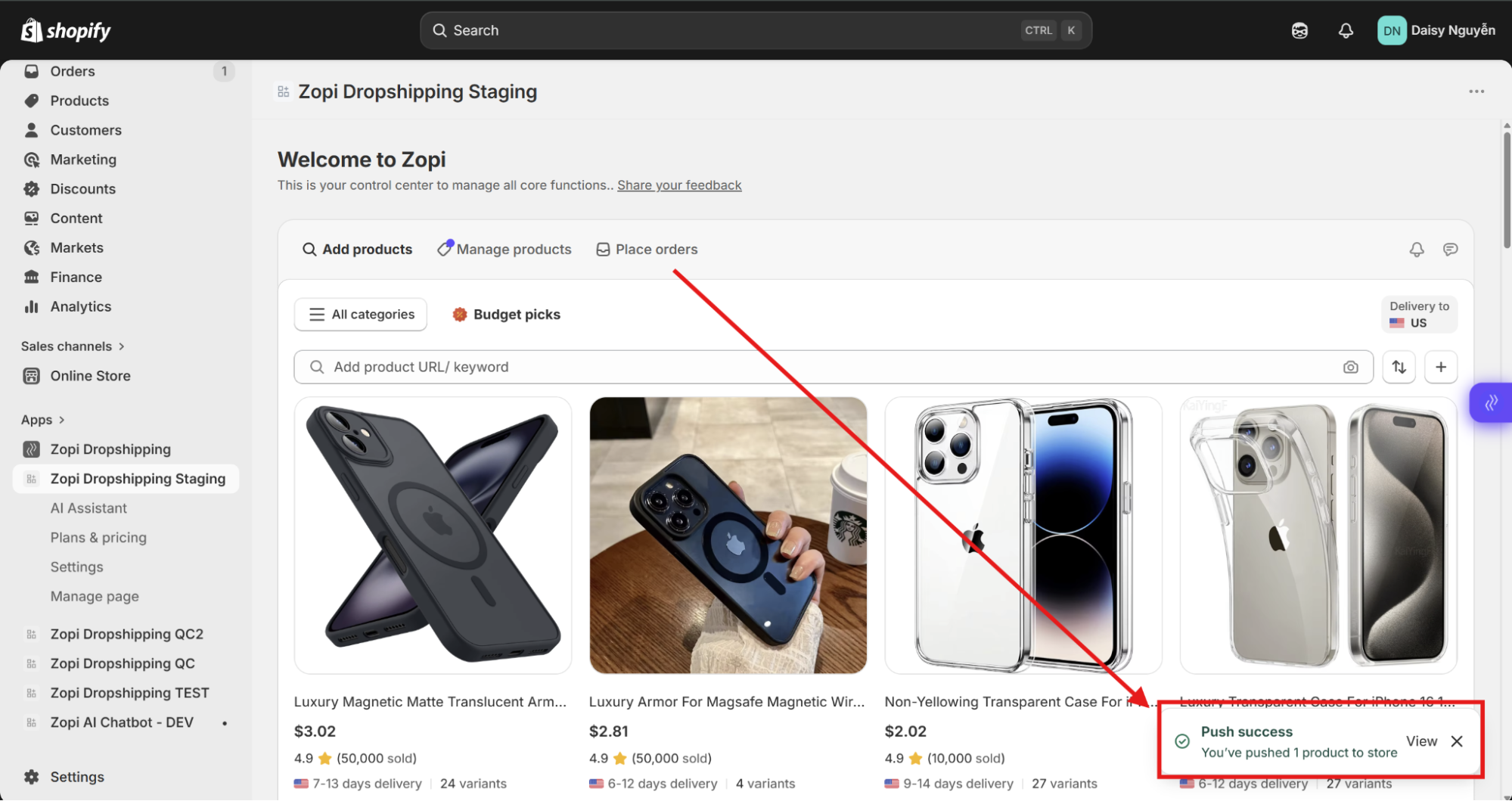
  • Click Push to Store again
  • Once successful, you will see a success notification
  • The product is now added to your Shopify store
What Happens After Pushing

After a successful push:

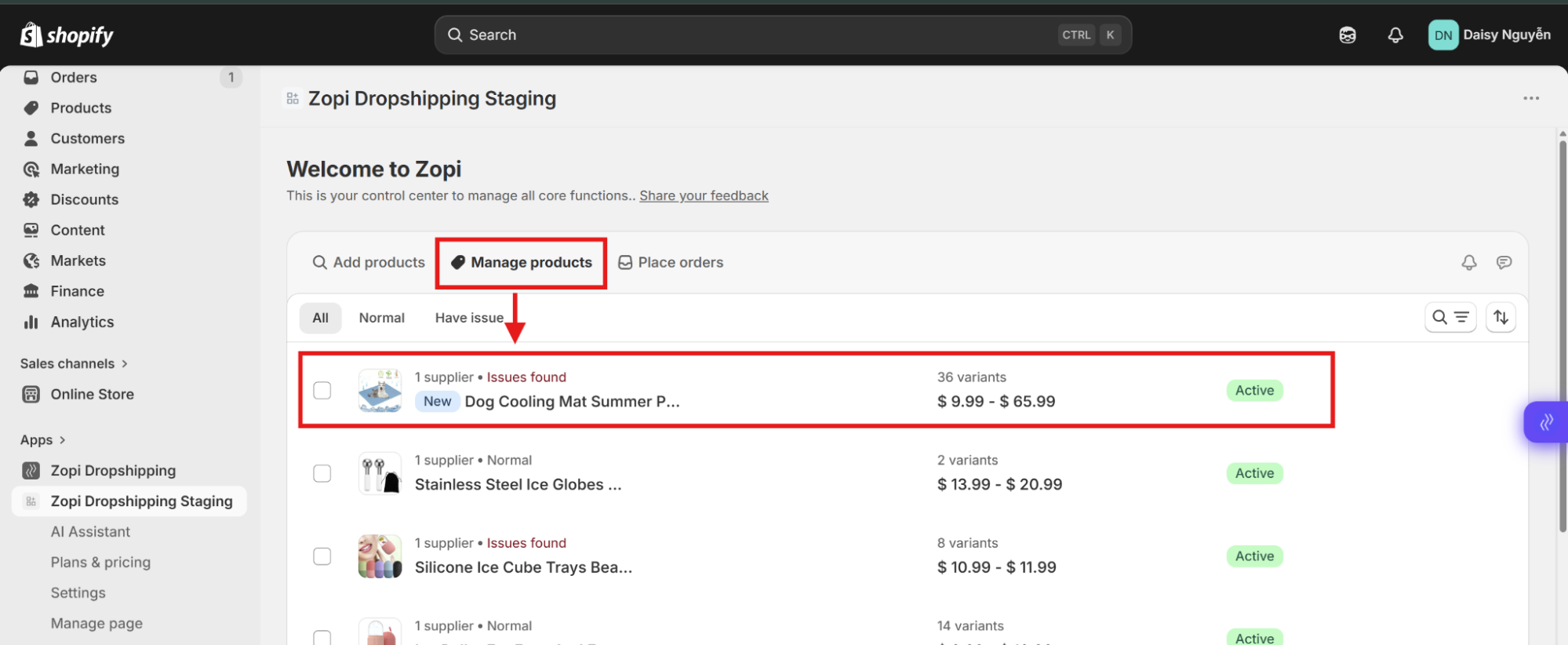
  • The product appears in: Zopi > Manage Products
  • It is also available in your Shopify product list
  • Supplier mapping is saved for fulfillment
  • You can start receiving and processing orders
Best Practices

  • Always review content before pushing
    → Supplier titles are often not optimized
  • Use Auto pricing rules
    → Save time and keep consistent margins
  • Set product as Draft if you want to review in Shopify first
  • Check shipping time and destination
    → Avoid suppliers with long delivery times

Conclusion

  • Importing via AliExpress link is a quick and efficient workflow:
  • Copy link → Paste into Zopi → Adjust settings → Push to store.

With the push settings, you have full control over how the product appears and behaves in your store.

Need Help?

If you need assistance while using Zopi:

👉 Our team is available to help you resolve issues quickly and keep your orders running smoothly.

Related articles

Can I Import Products from Temu or Other Platforms into Zopi?

Zopi supports importing products from multiple supplier platforms, allowing you to build your Shopify store more flexibly. This guide explains which platforms are supported, how importing works, and what limitations you should know before importing products. Supported Platforms in Zopi You can import products into Zopi from: AliExpress Temu eBay Amazon These products can be…

How to Edit a Product Before Pushing to Your Store in Zopi

Editing your product before publishing helps you improve quality, pricing, and conversion. This step ensures your product looks professional and is ready to sell. When Should You Edit a Product? You should always edit a product before pushing it to your Shopify store. Imported products (from AliExpress, Temu, eBay, Amazon) often have: Messy titles Low-quality…

How to Import Products Using the Zopi Chrome Extension

The Zopi Chrome Extension allows you to quickly import products from supported supplier platforms directly into your Shopify dropshipping workflow. This guide explains how to install the extension, import products, and prepare them for your store. What the Zopi Chrome Extension Does The Zopi Chrome Extension helps you: Import products faster Analyze supplier products View…

Subscribe
Notify of
guest

0 Comments
Inline Feedbacks
View all comments

Table of contents

When to Use This MethodStep-by-Step: Import via AliExpress LinkStep 1: Copy the product linkStep 2: Paste link into ZopiPush Settings ExplainedStep 3: Push to your storeWhat Happens After PushingBest PracticesConclusionNeed Help?

Related articles

How to Filter Products Before Add in Zopi

Filtering products before import helps you find better products faster and avoid importing low-quality or unsuitable items into your store. This guide explains how to use product filters in Zopi to narrow down products by price, orders, shipping location, ratings, and more. Why Product Filtering Matters Not every supplier product is suitable for your store….

How to Edit a Product Before Pushing to Your Store in Zopi

Editing your product before publishing helps you improve quality, pricing, and conversion. This step ensures your product looks professional and is ready to sell. When Should You Edit a Product? You should always edit a product before pushing it to your Shopify store. Imported products (from AliExpress, Temu, eBay, Amazon) often have: Messy titles Low-quality…

How to Import Products Using the Zopi Chrome Extension

The Zopi Chrome Extension allows you to quickly import products from supported supplier platforms directly into your Shopify dropshipping workflow. This guide explains how to install the extension, import products, and prepare them for your store. What the Zopi Chrome Extension Does The Zopi Chrome Extension helps you: Import products faster Analyze supplier products View…

Share your thought