
Order Center

Instant Fulfillment with Zopi: Let Zopi Handle Your Orders — Smarter, Faster, Better

Update on: 28/10/2025

Table of contents

EligibilityWhy Switch to Instant FulfillmentWhy You’ll Love It

Managing fulfillment used to mean chasing suppliers, sending messages, waiting for replies, and hoping your orders went through on time. Now, you don’t have to.

With Zopi Instant Fulfillment, all the supplier communication, sourcing, and issue handling are done for you – automatically – so you can focus on selling.

Eligibility

Instant Fulfillment is available when Zopi identifies a better supplier option for your orders — helping you fulfill faster and earn higher profit.
Order have “100% fulfillable” badge would be eligible for this flow.
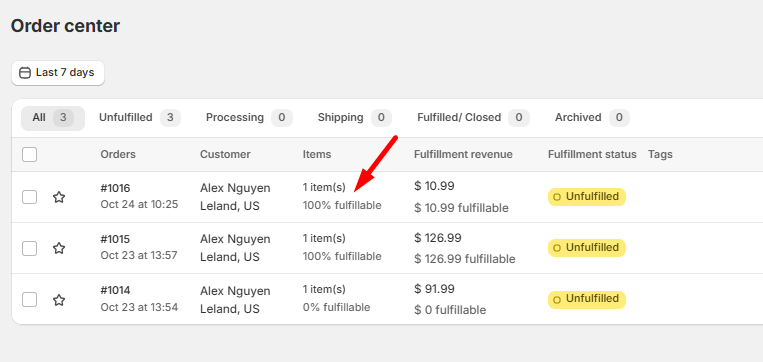
Why Switch to Instant Fulfillment

  • Zero supplier headaches: Zopi manages refunds, replacements, and out-of-stock issues directly with suppliers.

  • Automatic profit boost: If a supplier runs out, Zopi finds a better one with faster shipping and higher margins.

  • Smarter fulfillment: Orders are instantly remapped to available products to prevent delays.

  • No shipping errors: Auto address correction ensures every order reaches the right customer.

  • Better product mapping: Zopi recommends the most profitable and reliable alternatives for every item.

Why You’ll Love It

By switching to Instant Fulfillment, you’re freeing your business from manual work and unnecessary supplier management.

You’ll:

  • Save hours every week — no more chasing suppliers

  • Secure better profit margins automatically

  • Deliver faster and more accurately

  • Let Zopi handle all supplier communication, sourcing, and refund issues

  • Focus on scaling your store instead of managing logistic.


You sell — Zopi fulfills. No supplier drama. No manual work. Focus on growth.

With Instant Fulfillment, you’re not just processing orders — you’re building a business that runs smoother, faster, and smarter with Zopi.

>> Login now to try this smart function.

Related articles

Cancel An Order on Shopify

If you operate a Shopify store, you may need to cancel orders for various reasons. Please note that you can only cancel orders with a fulfillment status of Unfulfilled. Follow the steps below to learn how to effectively cancel an order on Shopify. How to Cancel an Order on Shopify Step-by-Step Guide to Cancel an…

Meet Special Customs Clearance Requirements

To comply with customs regulations, it is essential to ensure that all orders to Brazil, Korea, or Chile include specific customs clearance information in the Customer info section. Without this crucial information, orders cannot be successfully placed with your suppliers. Country Filed in Customer Detail What Information to Fill In Brazil CPF An 11-digit number…

Bulk Fulfill Orders

Zopi streamlines your ordering process, allowing you to place bulk orders with your suppliers in just a few clicks. Follow this comprehensive guide to efficiently navigate the bulk ordering process and fulfill your orders quickly. How to Fulfill Orders in Bulk Log in to Zopi and navigate to the Order Center page, then select the…

Subscribe
Notify of
guest

0 Comments
Inline Feedbacks
View all comments

Table of contents

EligibilityWhy Switch to Instant FulfillmentWhy You’ll Love It

Related articles

Change the Quantity of an Order

If your customer wants to change the order quantity after it has been received in your store, please follow the solutions below before placing the order in Zopi. How to Change the Quantity of an Order To effectively change the quantity of an order, you will need to make adjustments directly in your Shopify store….

Get the Tracking Code update

If your supplier updates the order tracking number, you can utilize Zopi’s Sync Order Status feature to automatically synchronize new tracking numbers with your store, ensuring that your customers receive the most accurate shipping information. Sync Order Status Steps to Sync Order Status Log in to Zopi and navigate to the Order Center. Click on…

Synchronize Temu Orders Status

After receiving your tracking number from Temu, you can easily synchronize it with Zopi using the Sync order status feature. How to Sync Your Temu Tracking Number with Zopi Visit the Temu website and log in to your account. Ensure that the country setting on your Temu account matches the shipping address of your order….

Share your thought