
Order Center

Order Payment Failed – What to Do in Zopi

Update on: 07/05/2026

Table of contents

What “Order Payment Failed” MeansCommon Reasons for Payment FailureHow to Fix Order Payment FailedStep 1: Check Order StatusStep 2: Review Payment MethodStep 3: Verify AliExpress Account (if applicable)Step 4: Fix Any IssuesHow to Retry Payment in ZopiRecommended WorkflowBest PracticesConclusionNeed Help?

If an order payment fails, the order will not be fulfilled. This guide shows you how to identify the cause and fix it quickly so your orders can be processed without delay.

What “Order Payment Failed” Means

An Order Payment Failed status means Zopi could not complete the payment to the supplier during fulfillment.

As a result:

  • The order is not placed with the supplier
  • No tracking number is generated
  • The order remains unfulfilled

Common Reasons for Payment Failure

Here are the most common causes:

  • Insufficient balance in your payment method
  • Invalid or expired card
  • Payment method not linked correctly
  • Bank declined the transaction
  • AliExpress payment issue (e.g., security verification)

How to Fix Order Payment Failed

Follow these steps:

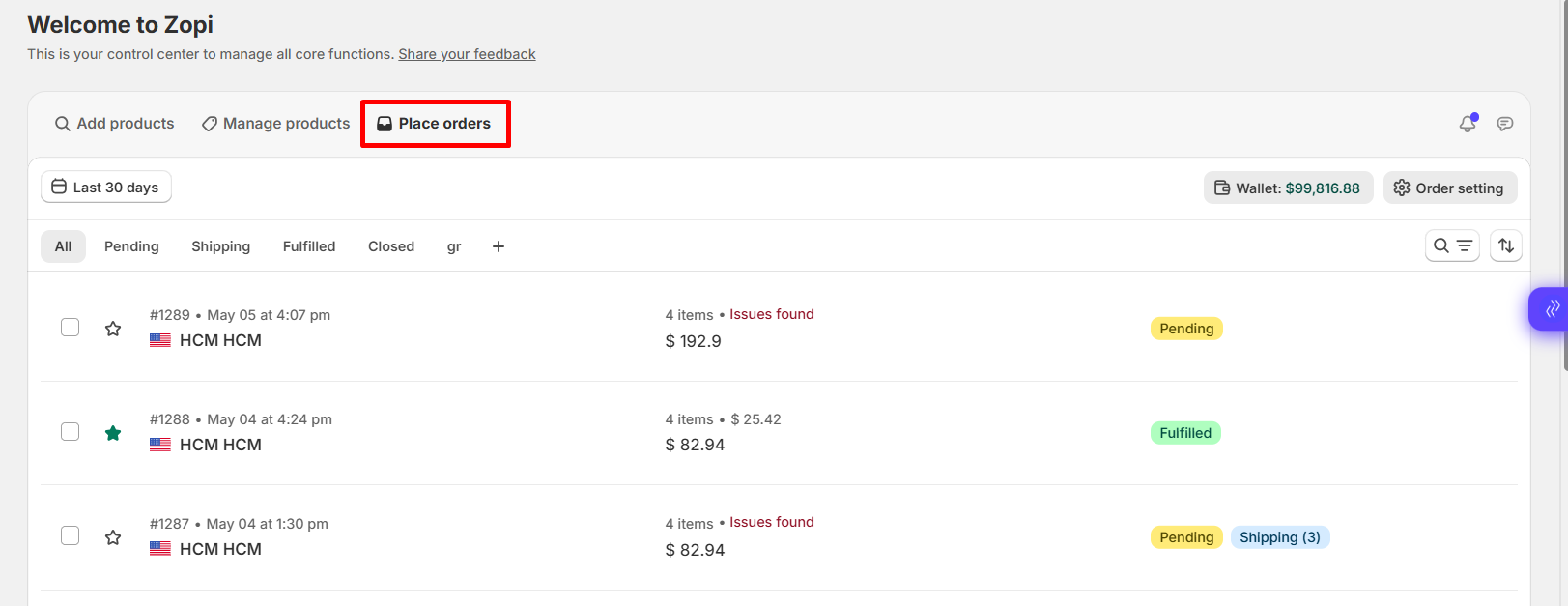
Step 1: Check Order Status

  • Go to: Zopi > Place Orders
  • Find the order with Payment Failed status
Step 2: Review Payment Method

  • Ensure your payment method is:
    • Active
    • Has enough balance
    • Supports international payments

Step 3: Verify AliExpress Account (if applicable)

  • Log in to your AliExpress account
  • Check for:
    • Payment verification requests
    • Security checks
    • Account restrictions

Step 4: Fix Any Issues

Depending on the cause:

  • Update your card
  • Add funds
  • Complete verification on AliExpress

How to Retry Payment in Zopi

Once the issue is fixed:

  1. Go to: Zopi > Place Orders
  2. Select the failed order
  3. Click Retry Payment or Pay Now
  4. Confirm the payment

👉 Zopi will attempt to place the order again with the supplier.

To avoid payment issues, follow this process:

  1. Import product
  2. Edit product
  3. Push to store
  4. Receive order
  5. Ensure payment method is ready
  6. Fulfill order via Zopi

Best Practices

  • Always keep sufficient balance in your payment method
  • Use a stable card for international transactions
  • Regularly check your Zopi > Place Orders dashboard
  • Complete any supplier (AliExpress) verification early
  • Avoid switching payment methods during active orders

Conclusion

Order payment failure means the supplier was not paid, so the order is not processed.

By checking your payment method and retrying payment in Zopi, you can quickly resolve the issue and continue fulfilling orders smoothly.

Need Help?

If you need assistance while using Zopi:

👉 Our team is available to help you resolve issues quickly and keep your orders running smoothly.

Related articles

Cancel An Order on Shopify

If you operate a Shopify store, you may need to cancel orders for various reasons. Please note that you can only cancel orders with a fulfillment status of Unfulfilled. Follow the steps below to learn how to effectively cancel an order on Shopify. How to Cancel an Order on Shopify Step-by-Step Guide to Cancel an…

Meet Order Requirements for Specific Countries

To comply with supplier regulations and customs clearance rules, orders shipped to specific countries must meet certain requirements. This ensures that your suppliers can efficiently process the orders and that your shipments arrive without delays. Order Requirements for Specific Countries Country Phone Number Name Spacing Customs Clearance Info Postal Code VAT Information Brazil ✔️ ✔️…

Set Default Message to AliExpress Suppliers

When placing orders, you may have specific requirements for your suppliers. Utilize the Set Default Message to Supplier feature to communicate directly with your supplier during the ordering process. Please note that this feature is exclusively available for AliExpress as the order source. Follow the steps below to set it up effectively. How to Set…

Subscribe
Notify of
guest

0 Comments
Inline Feedbacks
View all comments

Table of contents

What “Order Payment Failed” MeansCommon Reasons for Payment FailureHow to Fix Order Payment FailedStep 1: Check Order StatusStep 2: Review Payment MethodStep 3: Verify AliExpress Account (if applicable)Step 4: Fix Any IssuesHow to Retry Payment in ZopiRecommended WorkflowBest PracticesConclusionNeed Help?

Related articles

Zopi Order Automation – Complete Guide

Zopi’s Order Automation helps you process orders faster, reduce manual work, and ensure consistency. You decide when automation should run ( Triggers + Conditions ) and what Zopi should do ( Actions ). What is Order Automation? Order Automation in Zopi enables you to set up rules that automatically process orders according to your preferences…

How AI Assistant Helps Manage Orders

Zopi AI Assistant helps simplify order management by assisting with operational tasks directly inside Zopi. Instead of manually checking and processing orders one by one, you can ask the assistant to help retrieve order information, review pending orders, and support fulfillment workflows. 👉 AI Assistant focuses on helping you manage orders faster and more efficiently….

Cancel An Order and Refund/Return Policy on AliExpress

Sometimes, you may need to cancel a dropshipping order. This could be due to a customer changing their mind or discovering that your supplier is out of stock. Here’s how to cancel an order on AliExpress and handle refund requests. How to Cancel an Order from AliExpress Steps to Cancel an Order successfully cancel an…

Share your thought