
If you cannot import products into Zopi, the issue is usually related to your product import quota or file import requirements.
This article explains the most common reasons and how to fix them.
Product Import Quota Reached
Each Zopi subscription plan includes a different product import quota.
Once the quota is used up, it will not automatically renew.
To continue importing products, you will need to upgrade your plan.
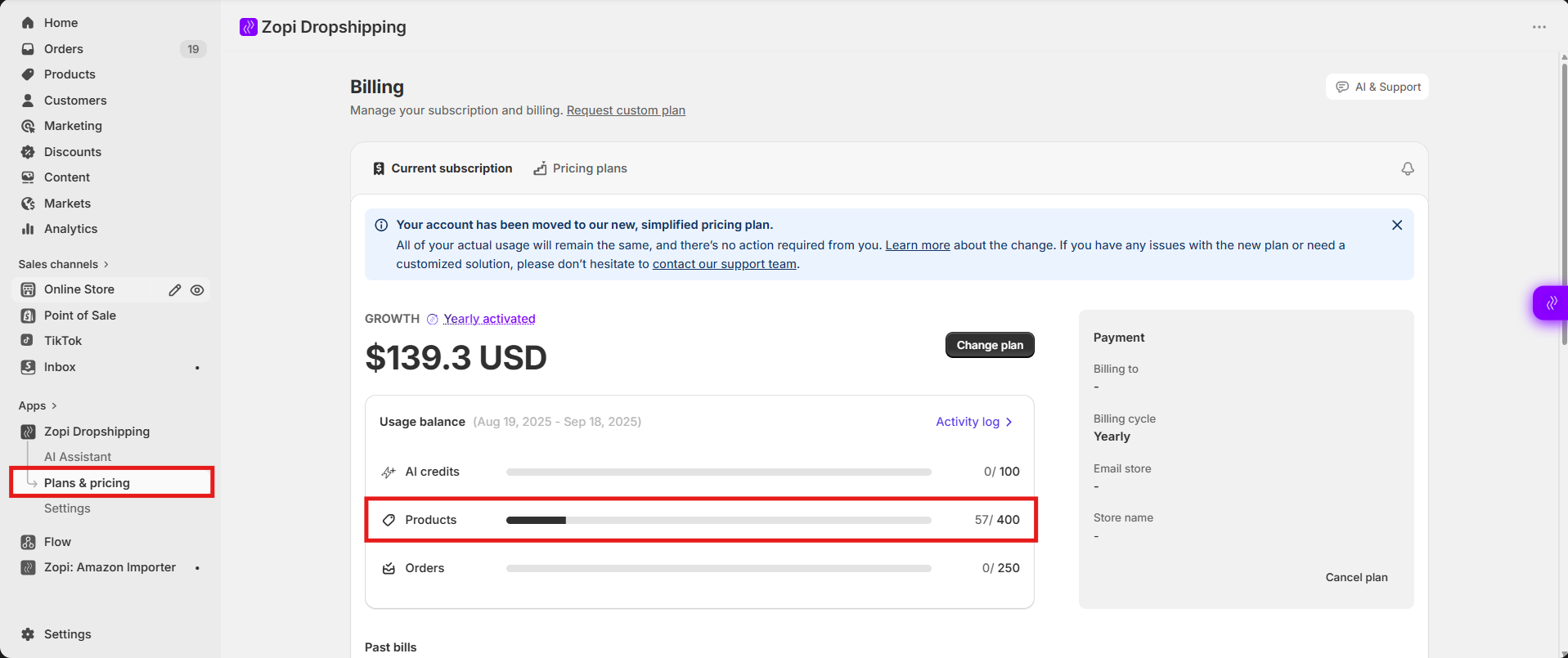
How to Check Your Remaining Product Quota
- Open Zopi > Plan & Pricing
- Check the Product Quota section.
- Review:
- Total imported products
- Remaining product quota
How to Fix
If your quota has reached the limit, you can upgrade your current plan or delete imported products to restore the quota before importing more products.
Add from File Feature Not Available
The Add from File feature is only available for users on the Explorer plan or higher.
If you are using a lower plan, you may not be able to:
- Upload CSV files
- Import products in bulk from files
How to Check Your Current Plan
- Open Zopi > Plan & Pricing
- Review your current subscription plan
If your current plan does not support this feature, you will need to upgrade to use Add from File.
CSV File Errors
If you receive an error while importing from a file, the issue may be related to the CSV file format or content.
Common CSV File Issues
Invalid File Format
Make sure your file:
- Uses the .csv format
- Is not corrupted
Too Many Products
The maximum supported limit is:
- Up to 1000 products per file
If your file exceeds the limit:
- Split the file into smaller batches
- Upload them separately
Best Practices for CSV Import
- Use one supplier link per row
- Double-check links before uploading
- Test with a small file first before importing large batches
Conclusion
If you cannot import products in Zopi, the issue is usually caused by:
- Reaching your product import quota
- Using a plan that does not support file import
- CSV file formatting or link errors
Checking your plan, quota usage, and file format can help resolve most import issues quickly.
Need Help?
If you need assistance while using Zopi:
- Contact our support team via Live Chat inside Zopi
- Visit the Zopi Help Center for more guides
- Join the Zopi Community to ask questions and learn from other users
👉 Our team is available to help you resolve issues quickly and keep your orders running smoothly.