
Troubleshooting & FAQs

How to Fix the “Account Is Running Out of Usage (Less Than 10%)” Warning in Zopi.

Update on: 04/12/2025

Table of contents

What Is the “Account Is Running Out of Usage” Message?Why This Warning Matters for DropshippingStep-by-Step Guide to Fix the Issue by Upgrading Your Zopi PlanStep 1: Go to Settings & BillingStep 2: Select “Change Plan”Step 3: Choose a Higher PlanConclusion

When managing your dropshipping business, staying within your plan’s usage limits is essential to ensure smooth operations. Zopi notifies you when your account’s usage is running low so you can upgrade in time and avoid interruptions. This article explains what the “Account is running out of usage (less than 10%)” message means and how to resolve it quickly.


What Is the “Account Is Running Out of Usage” Message?

The “Account is running out of usage (less than 10%)” notification appears when:

  • Your current plan’s usage limit is nearly full

  • You have less than 10% of your allowed actions or quota remaining

  • Your usage renewal date hasn’t reset yet

You may see this message in two places:

  • Notifications

  • Billing & Plan section in your Zopi account
    .

Why This Warning Matters for Dropshipping

Running out of usage can impact your dropshipping workflow in several ways:

  • Unable to fulfill orders: If you hit the limit, you may be temporarily unable to fulfill new customer orders.

  • Restricted product actions: Importing or pushing products may stop until usage resets or you upgrade.

  • Delayed automation features: Essential automated tasks may pause, affecting your store’s operations.

By upgrading your plan before your quota runs out, you avoid workflow interruptions and ensure a seamless experience for both you and your customers.


Step-by-Step Guide to Fix the Issue by Upgrading Your Zopi Plan

To resolve this warning, simply upgrade to a higher plan with more usage. Follow the steps below to upgrade smoothly.

Step 1: Go to Settings & Billing

  1. Log in to your Zopi account.

  2. From the left sidebar, click Settings & Billing.

Step 2: Select “Change Plan”

  1. Click the Change Plan button.

  2. Review all available plan options, including usage limits and features.


Step 3: Choose a Higher Plan

  1. Select a plan with higher usage to support your store’s needs.

  2. Confirm your upgrade and complete the payment.
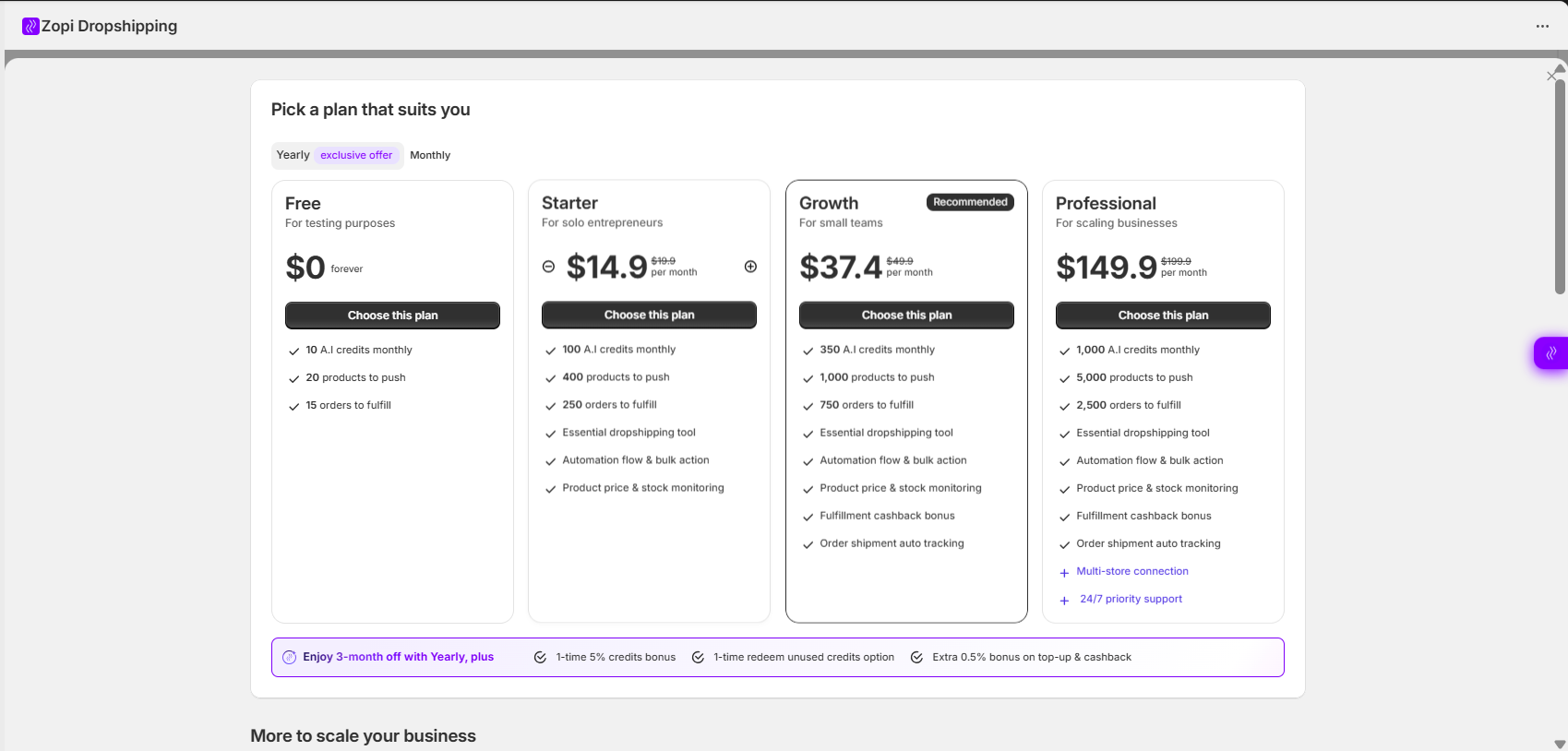
After the upgrade, your usage quota will refresh immediately, and the warning message will disappear.


Conclusion

The “Account is running out of usage (less than 10%)” warning is a helpful reminder to upgrade your plan before hitting your limit. By following the steps in this guide, you can easily upgrade through Settings & Billing → Change Plan and keep your Zopi workflows running seamlessly.

If you need additional help, feel free to contact Zopi Support anytime.


Related articles

What is the Shopify ‘Request fulfillment’ option?

In general, Zopi synchronizes orders with the PAID and UNFULFILLED statuses, enabling you to fulfill orders with just a few clicks. However, exercise caution when using the Request Fulfillment button in Shopify. Clicking Request Fulfillment sends a request to a third-party fulfillment service app like Zopi. This action initiates the workflow, changing the order status…

How to get custom packaging for AliExpress Dropshipping?

When you’re dropshipping, the first step in establishing your brand identity is to utilize custom packaging. From your customer’s perspective, the products they receive are associated with your brand, not merely a supplier. This strategy not only makes your store distinctive but also helps you differentiate yourself from the competition. One of the easiest ways…

What will happen when you uninstall and re-install our Zopi app?

Uninstalling the Zopi App If you decide to uninstall the Zopi app, here’s what you need to know: 1. Loss of Access to Zopi Features You will no longer be able to use any Zopi features. All app-related data will become inaccessible. 2. Inventory Management for Merchants Using Zopi for Fulfillment Before uninstalling, ensure your…

Subscribe
Notify of
guest

0 Comments
Inline Feedbacks
View all comments

Table of contents

What Is the “Account Is Running Out of Usage” Message?Why This Warning Matters for DropshippingStep-by-Step Guide to Fix the Issue by Upgrading Your Zopi PlanStep 1: Go to Settings & BillingStep 2: Select “Change Plan”Step 3: Choose a Higher PlanConclusion

Related articles

How to get the order tracking code with AliExpress automatically?

To ensure that merchants and their customers receive shipping status updates quickly and in real-time, we have introduced a new feature in the latest version of Zopi. This feature is especially beneficial for dropshippers. From now on, all order tracking codes will be automatically synced to Zopi and sent to your customers as soon as…

Orders not appearing on AliExpress

While you fulfill orders on AliExpress, Zopi automatically adds products to the cart and fills in the customer’s information for payment to the supplier on AliExpress. If you can’t see all your orders on your AliExpress account, follow these tips to resolve the issue. Check if Your Link to AliExpress Has Expired Reason: AliExpress clears…

Why are my products not showing on my Shopify page?

If you’re not seeing your products appear in your Shopify store, there are several potential reasons to consider: 1. Check Product Status: Make sure that you have switched the Unpublish status to published before uploading the product to Shopify. 2. Product Availability: Another common issue is that your products may not be set to be…

Share your thought