Troubleshooting & FAQs

How to Fix the “Fulfillment Is Rejected” Error in Zopi

Update on: 04/12/2025

Table of contents

Why the “Fulfillment Is Rejected” Error HappensHow to Avoid This Error in the FutureRelated Resources

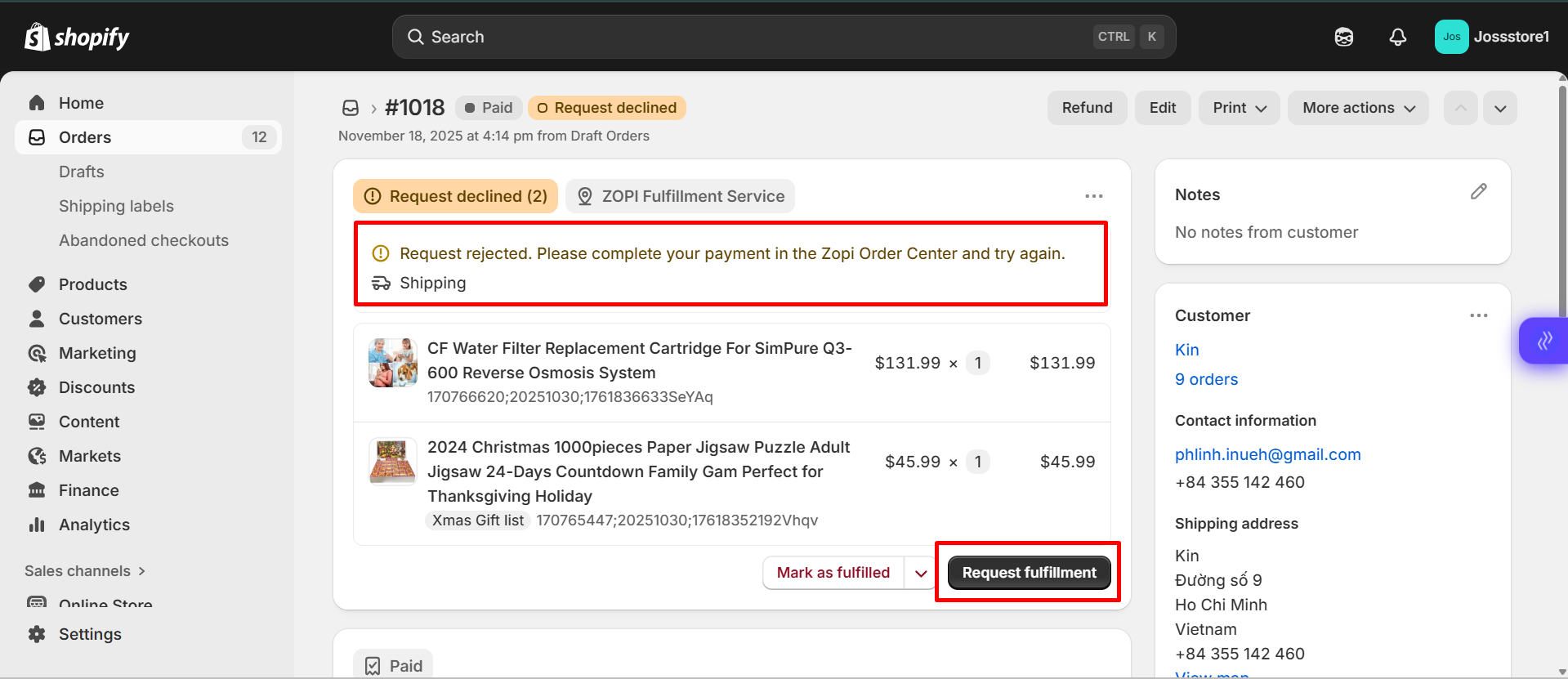
If you see the message “Request rejected. Please complete your payment in the Zopi Order Center and try again.”, this means the order could not be fulfilled because it was triggered incorrectly from Shopify instead of Zopi. This error is common among new dropshippers who are still learning how automated fulfillment works.

This guide explains why the error appears and shows you how to correctly process your order through Zopi so your supplier can receive the payment and ship the package successfully.
 

Why the “Fulfillment Is Rejected” Error Happens

This error usually appears when merchants click “Request fulfillment” directly inside the Shopify Order page, which Shopify interprets as a request to fulfill the order outside of Zopi.

To help you understand the cause clearly, below are the main reasons why the system rejects the request:

  • Shopify does not send the order to the supplier
    The “Request fulfillment” button only updates Shopify’s internal fulfillment status — it does not place the order with AliExpress/Temu/eBay/Amazon.
  • Zopi cannot detect supplier payment
    When the order is not processed from the Zopi Order Center, the supplier never receives payment, so fulfillment cannot start.
  • The system displays the rejection message to notify you
    The message “Please complete your payment in the Zopi Order Center” is meant to guide you to the correct workflow.

How to Fix It

You can resolve this error immediately by fulfilling the order correctly inside the Zopi app.

To fix:

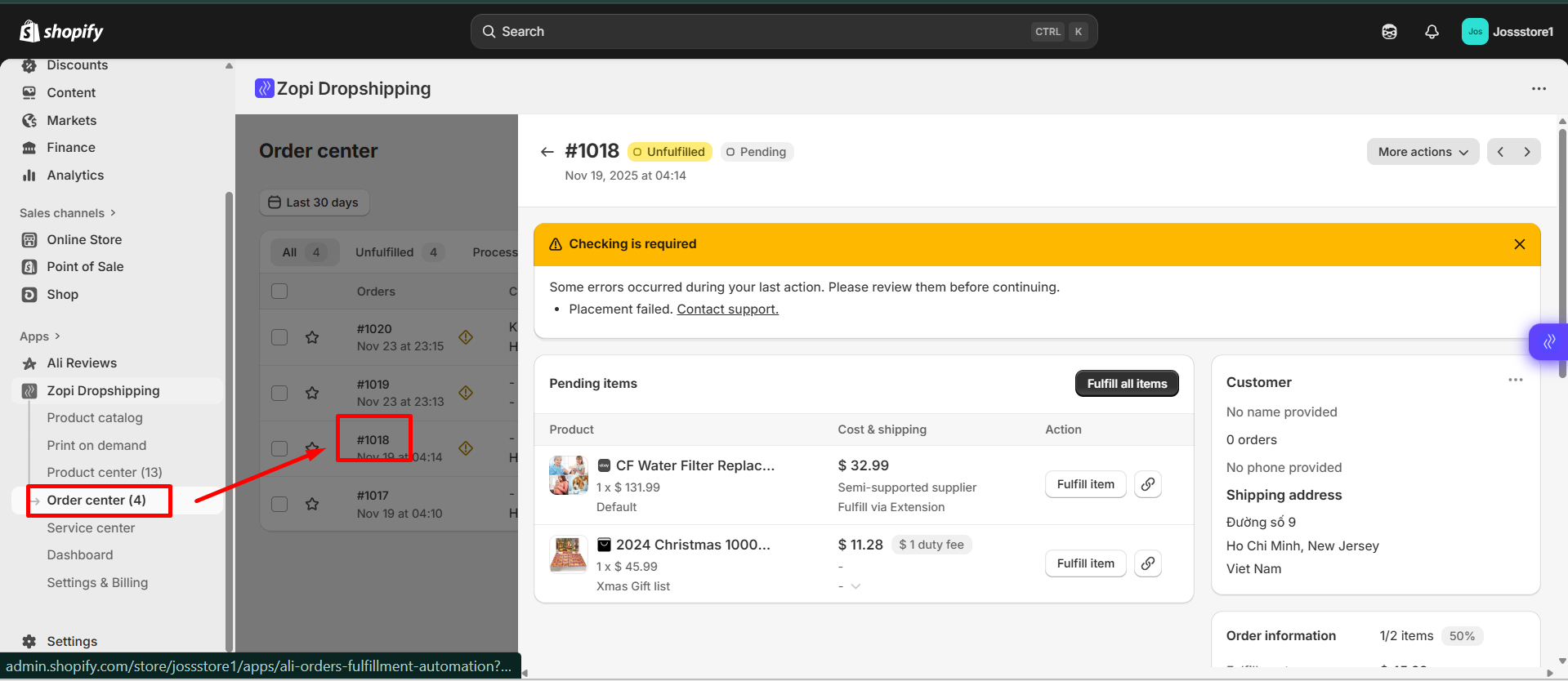
  1. Open the Zopi app

  1. Go to Order Center
  2. Click Fulfill Item
  3. Click Make Payment — Zopi will redirect you to the supplier checkout page
  4. Complete the payment with your supplier

Once paid, the order will update normally and tracking will sync automatically.

For the full step-by-step fulfillment guide, see:
👉 How to Fulfill Orders in Zopi 


How to Avoid This Error in the Future

Understanding the correct workflow helps prevent fulfillment interruptions. Here are tips to avoid the error:

  • Always fulfill orders inside the Zopi Order Center, not Shopify
  • Do not click “Request fulfillment” on the Shopify Order page
  • Make sure you are logged in to your supplier account in the same browser
    Regularly sync products and mapping to prevent mismatches

To help you manage your orders more efficiently, check out our guide on
How Zopi Automates Order Fulfillment.

Related articles

How to Fix the “Product Is Unavailable” Error in Zopi

When you try to fulfill an order or push a product to your Shopify store, you may see the message “Product is unavailable.” This error usually appears when the supplier can no longer sell the item, or when the product is restricted in the customer’s destination country. This guide explains why the error happens and…

What to do when the shipping methods is unavailable on order?

A common issue you may encounter is {Source} doesn’t ship to {country}. Change source error when placing orders on AliExpress. This error typically indicates that the product cannot be shipped to your customer’s location. To resolve this issue, follow the steps outlined below. How to Resolve Shipping Issues in Zopi Log in to Zopi and…

How does Lunar New Year 2025 impact order processing?

Lunar New Year, also known as Spring Festival, is one of the biggest events in East Asian countries. During this festive period, most manufacturing businesses close to celebrate. If you’re running a dropshipping store, you might be wondering: “How does this impact order processing?” Let’s break it down: In 2025, the Lunar New Year occurs…

Subscribe
Notify of
guest

0 Comments
Inline Feedbacks
View all comments

Table of contents

Why the “Fulfillment Is Rejected” Error HappensHow to Avoid This Error in the FutureRelated Resources

Related articles

How to Fix the “Account Is Running Out of Usage (Less Than 10%)” Warning in Zopi.

When managing your dropshipping business, staying within your plan’s usage limits is essential to ensure smooth operations. Zopi notifies you when your account’s usage is running low so you can upgrade in time and avoid interruptions. This article explains what the “Account is running out of usage (less than 10%)” message means and how to…

How to resolve customer information encryption issues on TikTok Shop Orders?

If you notice that TikTok Shop orders have hidden or encrypted customer names and addresses, it is likely because your TikTok Shop is set to “TikTok Shipping.” When this option is enabled, customer details, such as names and addresses, are concealed from sellers for privacy reasons. To view customer information and fulfill your orders, you…

How does Lunar New Year 2025 impact order processing?

Lunar New Year, also known as Spring Festival, is one of the biggest events in East Asian countries. During this festive period, most manufacturing businesses close to celebrate. If you’re running a dropshipping store, you might be wondering: “How does this impact order processing?” Let’s break it down: In 2025, the Lunar New Year occurs…

Share your thought