
When dropshipping, it’s common to encounter issues that prevent orders from being fulfilled. One such issue is Payment Timeout, which occurs when an order isn’t paid within the allowed timeframe by the supplier. This guide explains why it happens and how you can quickly fix it using Zopi so you can get back to fulfilling orders without losing sales.
What is a Payment Timeout Order?
A Payment Timeout order happens when:
- A customer places an order in your store.
- Zopi attempts to process the payment with the supplier.
- The payment isn’t completed within the supplier’s allowed timeframe.
When this occurs, Zopi automatically cancels the order to prevent overselling.
Step-by-Step Guide to Fix Payment Timeout Orders Using Zopi
Here’s how to revert and fulfill a Payment Timeout order in Zopi:
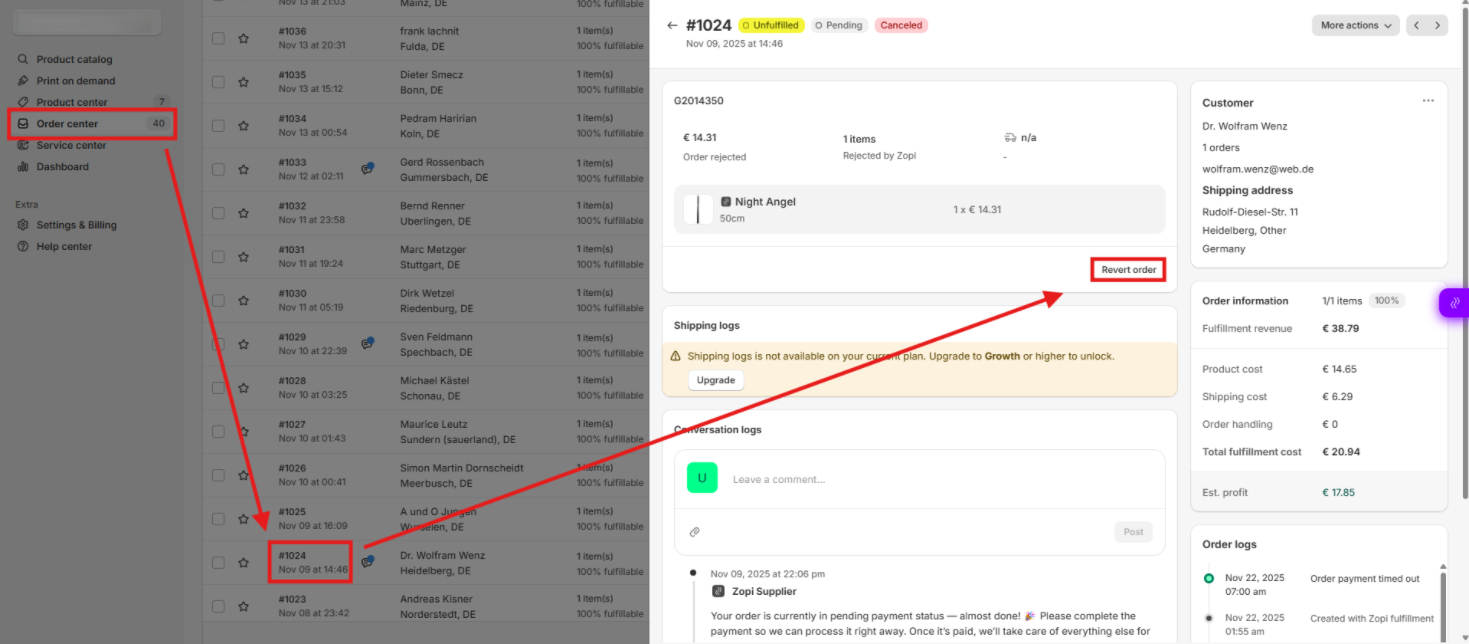
Step 1: Access the Order Center
- Log in to your Zopi account.
- Navigate to Order Center from the main dashboard.
- Locate the order with the Payment Timeout status.
Step 2: Open the Order Details
- Click on the Order ID to view full order details.
- Review the order to ensure it’s eligible for revert.
Step 3: Revert the Order
- Click the Revert Order button.
- Confirm the action when prompted.
- Wait for Zopi to process the revert—this resets the order status.
Step 4: Fulfill the Order Again
- Once reverted, go back to the order list.
- Click Fulfill Order to start the fulfillment process from scratch.
- Complete payment to the supplier within the required timeframe to avoid another timeout.
Conclusion
Payment Timeout orders don’t have to disrupt your dropshipping business. By quickly reverting and re-fulfilling orders in Zopi, you can:
- Recover lost sales
- Maintain smooth fulfillment
- Improve customer satisfaction
Start resolving Payment Timeout orders today to keep your store running efficiently. If you need further help, reach out to Zopi Support.