
Troubleshooting & FAQs

How to Fix Payment Timeout Orders in Zopi

Update on: 04/12/2025

Table of contents

What is a Payment Timeout Order?Step-by-Step Guide to Fix Payment Timeout Orders Using ZopiStep 1: Access the Order CenterStep 2: Open the Order DetailsStep 3: Revert the OrderStep 4: Fulfill the Order AgainConclusion

When dropshipping, it’s common to encounter issues that prevent orders from being fulfilled. One such issue is Payment Timeout, which occurs when an order isn’t paid within the allowed timeframe by the supplier. This guide explains why it happens and how you can quickly fix it using Zopi so you can get back to fulfilling orders without losing sales.


What is a Payment Timeout Order?

A Payment Timeout order happens when:

  • A customer places an order in your store.
  • Zopi attempts to process the payment with the supplier.
  • The payment isn’t completed within the supplier’s allowed timeframe.

When this occurs, Zopi automatically cancels the order to prevent overselling.


Step-by-Step Guide to Fix Payment Timeout Orders Using Zopi

Here’s how to revert and fulfill a Payment Timeout order in Zopi:

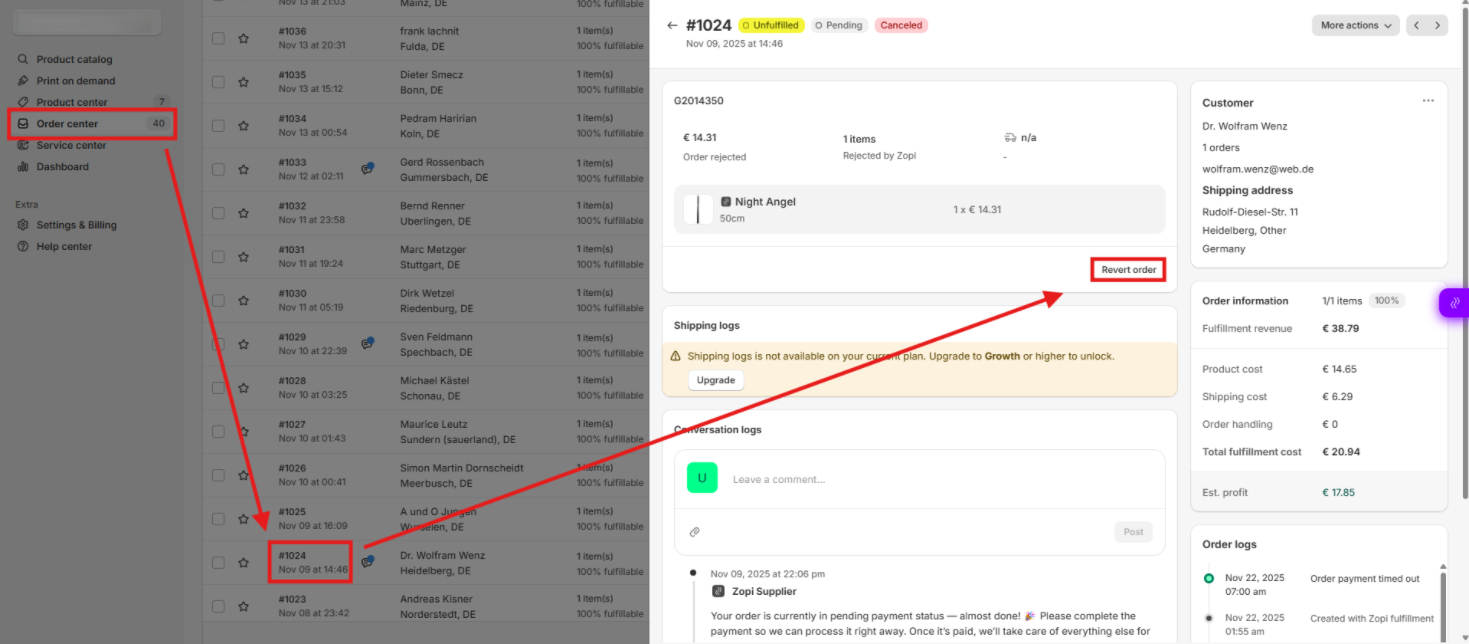
Step 1: Access the Order Center

  1. Log in to your Zopi account.
  2. Navigate to Order Center from the main dashboard.
  3. Locate the order with the Payment Timeout status.

Step 2: Open the Order Details

  1. Click on the Order ID to view full order details.
  2. Review the order to ensure it’s eligible for revert.

Step 3: Revert the Order

  1. Click the Revert Order button.
  2. Confirm the action when prompted.
  3. Wait for Zopi to process the revert—this resets the order status.

Step 4: Fulfill the Order Again

  1. Once reverted, go back to the order list.
  2. Click Fulfill Order to start the fulfillment process from scratch.
  3. Complete payment to the supplier within the required timeframe to avoid another timeout.
 

Conclusion

Payment Timeout orders don’t have to disrupt your dropshipping business. By quickly reverting and re-fulfilling orders in Zopi, you can:

  • Recover lost sales
  • Maintain smooth fulfillment
  • Improve customer satisfaction

Start resolving Payment Timeout orders today to keep your store running efficiently. If you need further help, reach out to Zopi Support.

Related articles

Orders not appearing on AliExpress

While you fulfill orders on AliExpress, Zopi automatically adds products to the cart and fills in the customer’s information for payment to the supplier on AliExpress. If you can’t see all your orders on your AliExpress account, follow these tips to resolve the issue. Check if Your Link to AliExpress Has Expired Reason: AliExpress clears…

What is the Shopify ‘Request fulfillment’ option?

In general, Zopi synchronizes orders with the PAID and UNFULFILLED statuses, enabling you to fulfill orders with just a few clicks. However, exercise caution when using the Request Fulfillment button in Shopify. Clicking Request Fulfillment sends a request to a third-party fulfillment service app like Zopi. This action initiates the workflow, changing the order status…

Why can’t I find some orders in Order Center?

There are two primary reasons why Shopify orders may not appear in the Order Center: 1. Payment Status Zopi only displays orders that are marked as PAID + UNFULFILLED in Shopify. To ensure your orders are visible, follow these steps: Verify that the order is marked as paid and unfulfilled. Check if the order appears…

Subscribe
Notify of
guest

0 Comments
Inline Feedbacks
View all comments

Table of contents

What is a Payment Timeout Order?Step-by-Step Guide to Fix Payment Timeout Orders Using ZopiStep 1: Access the Order CenterStep 2: Open the Order DetailsStep 3: Revert the OrderStep 4: Fulfill the Order AgainConclusion

Related articles

What to do if you get the Shopify error ‘Shipping not available for the selected address’?

Have you encountered an error while placing a test order or noticed it when customers try to make a purchase from your Shopify store? This error message typically indicates that the product(s) in the cart are having trouble accessing a shipping rate. This issue often arises from the way shipping is configured. To resolve it,…

Can I sync my product information from another Apps to your Zopi App?

When you transition from another application to the Zopi App, we automatically synchronize all your product information from Shopify to our platform. It’s important to note that we do not directly receive any information from other applications. As long as your product information is accessible on Shopify, we will seamlessly sync it to our app….

What is the Shopify ‘Request fulfillment’ option?

In general, Zopi synchronizes orders with the PAID and UNFULFILLED statuses, enabling you to fulfill orders with just a few clicks. However, exercise caution when using the Request Fulfillment button in Shopify. Clicking Request Fulfillment sends a request to a third-party fulfillment service app like Zopi. This action initiates the workflow, changing the order status…

Share your thought